- REMOVE FRONT SEAT ASSEMBLY RH
HINT:
Use the same procedure as for the LH side.
Refer to REMOVAL [06/2015 - 11/2018]
- REMOVE NO. 2 INSTRUMENT PANEL UNDER COVER SUB-ASSEMBLY
See step 6
- REMOVE COWL SIDE TRIM BOARD RH
HINT:
Use the same procedure as for the LH side.
See step 7
- DISCONNECT FRONT DOOR OPENING TRIM WEATHERSTRIP RH
HINT:
Use the same procedure as for the LH side.
See step 13
- REMOVE INTEGRATION CONTROL AND PANEL ASSEMBLY
Refer to PROCEDURE - Step 1
- REMOVE INSTRUMENT CENTER UPPER CLUSTER FINISH PANEL
See step 19
- REMOVE INSTRUMENT CENTER PANEL REGISTER ASSEMBLY
See step 20
- REMOVE NAVIGATION RECEIVER ASSEMBLY
Refer to PROCEDURE - Step 6
- REMOVE NO. 2 INSTRUMENT PANEL REGISTER ASSEMBLY
See step 27
- REMOVE INSTRUMENT SIDE PANEL RH
HINT:
Use the same procedure as for the LH side.
See step 25
- REMOVE GLOVE COMPARTMENT DOOR ASSEMBLY
See step 29
- REMOVE FRONT CONSOLE BOX COVER
- Open the console compartment door sub-assembly.
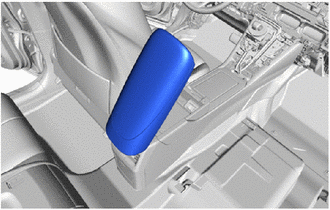 Courtesy of © TOYOTA, LICENSE AGREEMENT TMS1002 Courtesy of © TOYOTA, LICENSE AGREEMENT TMS1002
|
- Disengage the clips and guides to remove the front console box cover as shown in the illustration.
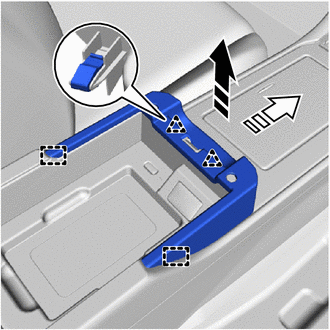 Courtesy of © TOYOTA, LICENSE AGREEMENT TMS1002 Courtesy of © TOYOTA, LICENSE AGREEMENT TMS1002
|
 |
Remove in this Direction (1) |
 |
Remove in this Direction (2) |
- REMOVE CONSOLE COMPARTMENT BOX ASSEMBLY
- Disengage the clips to remove the console compartment box assembly as shown in the illustration.
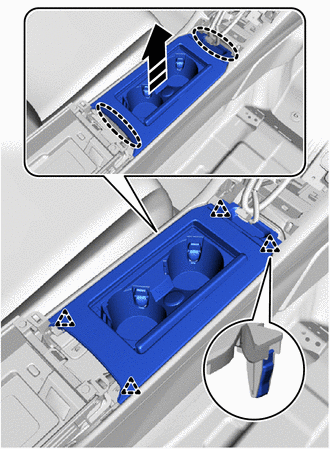 Courtesy of © TOYOTA, LICENSE AGREEMENT TMS1002 Courtesy of © TOYOTA, LICENSE AGREEMENT TMS1002
|
 |
Place Hands Here |
|
Remove in this Direction |
- REMOVE NO. 1 STEREO JACK ADAPTER ASSEMBLY
Refer to PROCEDURE - Step 2
- REMOVE MOBILE WIRELESS CHARGER CRADLE ASSEMBLY
Refer to PROCEDURE - Step 3
- REMOVE NO. 6 CONSOLE BOX RETAINER
- Remove the 2 screws and bolt.
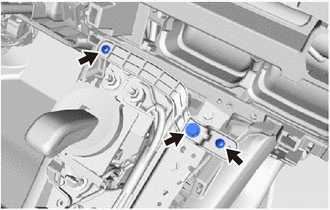 Courtesy of © TOYOTA, LICENSE AGREEMENT TMS1002 Courtesy of © TOYOTA, LICENSE AGREEMENT TMS1002
|
- Disengage the guide to remove the No. 6 console box retainer.
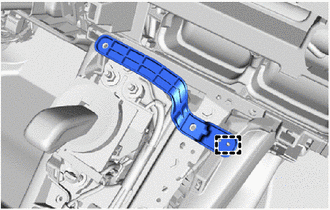 Courtesy of © TOYOTA, LICENSE AGREEMENT TMS1002 Courtesy of © TOYOTA, LICENSE AGREEMENT TMS1002
|
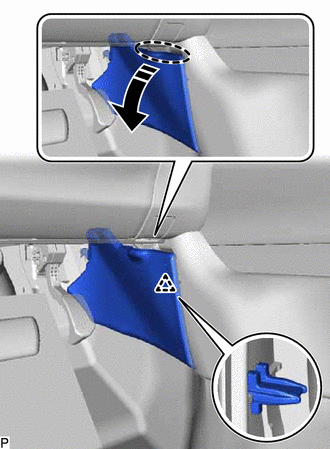
- REMOVE NO. 1 FRONT CONSOLE BOX INSERT
- Remove the clip.
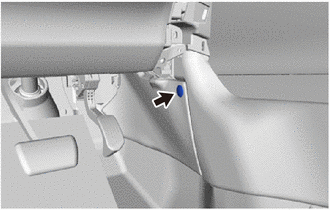 Courtesy of © TOYOTA, LICENSE AGREEMENT TMS1002 Courtesy of © TOYOTA, LICENSE AGREEMENT TMS1002
|
- Remove the No. 1 front console box insert:
 Courtesy of © TOYOTA, LICENSE AGREEMENT TMS1002 Courtesy of © TOYOTA, LICENSE AGREEMENT TMS1002
|
- Disengage the clip as shown in the illustration.
 Courtesy of © TOYOTA, LICENSE AGREEMENT TMS1002 Courtesy of © TOYOTA, LICENSE AGREEMENT TMS1002
|
|
Place Hands Here |
|
Remove in this Direction |
- Disengage the guide as shown in the illustration.
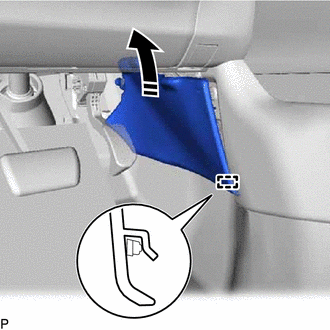 Courtesy of © TOYOTA, LICENSE AGREEMENT TMS1002 Courtesy of © TOYOTA, LICENSE AGREEMENT TMS1002
|
|
Remove in this Direction |
- Disengage the guide to remove the No. 1 front console box insert as shown in the illustration.
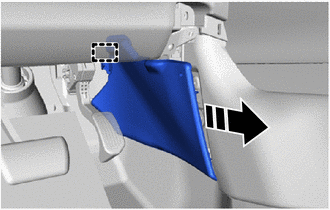 Courtesy of © TOYOTA, LICENSE AGREEMENT TMS1002 Courtesy of © TOYOTA, LICENSE AGREEMENT TMS1002
|
|
Remove in this Direction |
- REMOVE NO. 2 FRONT CONSOLE BOX INSERT
HINT:
Use the same procedure as for the No. 1 side.
- REMOVE NO. 2 CONSOLE BOX DUCT
- Remove the clip.
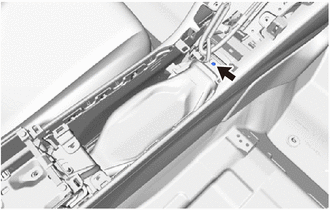 Courtesy of © TOYOTA, LICENSE AGREEMENT TMS1002 Courtesy of © TOYOTA, LICENSE AGREEMENT TMS1002
|
- Remove the No. 2 console box duct as shown in the illustration.
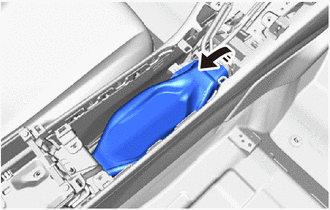 Courtesy of © TOYOTA, LICENSE AGREEMENT TMS1002 Courtesy of © TOYOTA, LICENSE AGREEMENT TMS1002
|
|
Remove in this Direction |
- REMOVE NO. 1 CONSOLE BOX DUCT
- Remove the 2 clips.
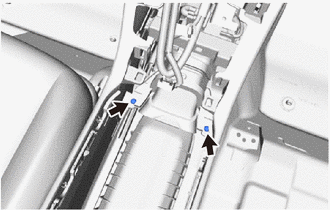 Courtesy of © TOYOTA, LICENSE AGREEMENT TMS1002 Courtesy of © TOYOTA, LICENSE AGREEMENT TMS1002
|
- Remove the No. 1 console box duct as shown in the illustration.
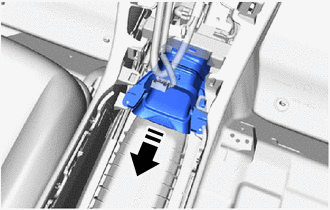 Courtesy of © TOYOTA, LICENSE AGREEMENT TMS1002 Courtesy of © TOYOTA, LICENSE AGREEMENT TMS1002
|
|
Remove in this Direction |
- REMOVE CONSOLE REAR END PANEL SUB-ASSEMBLY
- Disengage the clips and claws to remove the console rear end panel sub-assembly as shown in the illustration.
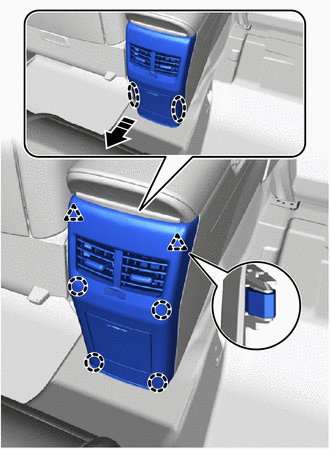 Courtesy of © TOYOTA, LICENSE AGREEMENT TMS1002 Courtesy of © TOYOTA, LICENSE AGREEMENT TMS1002
|
|
Place Hands Here |
|
Remove in this Direction |
- REMOVE NO. 4 CONSOLE BOX DUCT
- Remove the 2 clips.
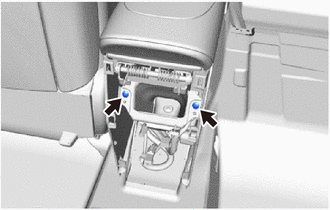 Courtesy of © TOYOTA, LICENSE AGREEMENT TMS1002 Courtesy of © TOYOTA, LICENSE AGREEMENT TMS1002
|
- Disengage the 2 guides to remove the No. 4 console box duct.
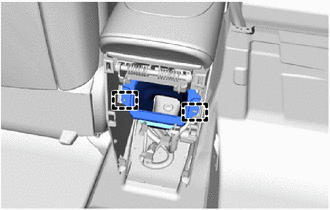 Courtesy of © TOYOTA, LICENSE AGREEMENT TMS1002 Courtesy of © TOYOTA, LICENSE AGREEMENT TMS1002
|
- REMOVE REAR CONSOLE BOX SUB-ASSEMBLY
- Remove the 2 clips.
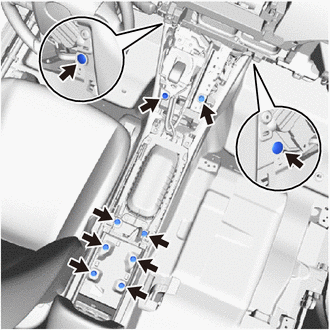 Courtesy of © TOYOTA, LICENSE AGREEMENT TMS1002 Courtesy of © TOYOTA, LICENSE AGREEMENT TMS1002
|
- Remove the 8 bolts.
- Remove the 3 bolts.
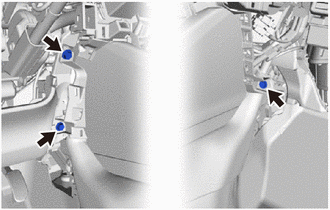 Courtesy of © TOYOTA, LICENSE AGREEMENT TMS1002 Courtesy of © TOYOTA, LICENSE AGREEMENT TMS1002
|
- Disengage the clamps.
- Disengage the clips as shown in the illustration.
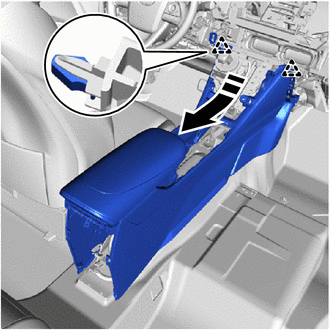 Courtesy of © TOYOTA, LICENSE AGREEMENT TMS1002 Courtesy of © TOYOTA, LICENSE AGREEMENT TMS1002
|
|
Remove in this Direction |
- Remove the rear console box sub-assembly as shown in the illustration.
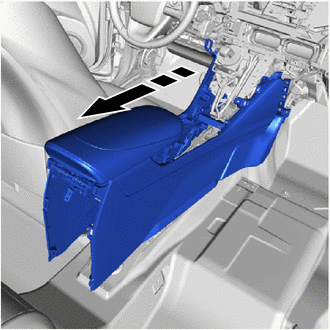 Courtesy of © TOYOTA, LICENSE AGREEMENT TMS1002 Courtesy of © TOYOTA, LICENSE AGREEMENT TMS1002
|
|
Remove in this Direction |