Navigation Ecu: Removal
- DISCONNECT CABLE FROM NEGATIVE BATTERY TERMINAL (for Manual Seat)
CAUTION:
Wait for 90 seconds after disconnecting the cable to prevent the airbag working (See
AIRBAG SYSTEM
).
- REMOVE SEAT TRACK BRACKET COVER OUTER FRONT LH
(See
REMOVAL
)
- REMOVE SEAT TRACK BRACKET COVER INNER FRONT LH
(See
REMOVAL
)
- REMOVE SEAT TRACK COVER LH
(See
REMOVAL
)
- REMOVE SEAT TRACK COVER RH
(See
REMOVAL
)
- REMOVE FRONT SEAT ASSEMBLY LH (w/o Front Seat Side Airbag)
(See
REMOVAL
)
- REMOVE FRONT SEAT ASSEMBLY LH (w/ Front Seat Side Airbag)
(See
DISASSEMBLY
)
- REMOVE NAVIGATION ECU COVER
- Remove the 4 claws and the navigation ECU cover.
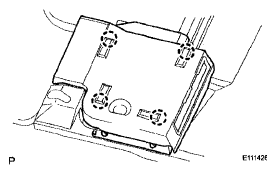 Courtesy of © TOYOTA, LICENSE AGREEMENT TMS1002
- REMOVE NAVIGATION ECU
- Remove the 2 bolts and the navigation ECU.
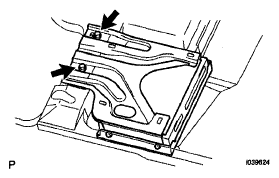 Courtesy of © TOYOTA, LICENSE AGREEMENT TMS1002
- Disconnect the 5 connectors.
- Remove the 4 screws, the disc player bracket and navigation ECU cover lower.
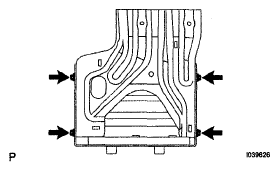 Courtesy of © TOYOTA, LICENSE AGREEMENT TMS1002