Electronic Column Lock Module - Assemble - Off Vehicle (Tilt Column)
- Install the lock bolt spring (3) into the steering column tilt head assembly (5).
- Position the cutout in the lock bolt assembly (4) at the 6 o'clock position.
- Install the lock bolt assembly (4) into the steering column tilt head assembly (5).
- Push the lock bolt assembly (4) into the steering m column tilt head assembly (5) until the lock bolt assembly is flush with the steering column tilt head assembly (5).
- Align the electronic lock module assembly (2) with the steering column tilt head assembly (5).
- Screw the 3 pan head tapping screws (1) into the electronic lock module assembly (2). Tighten the screws to 7 N.m (62 lb in).
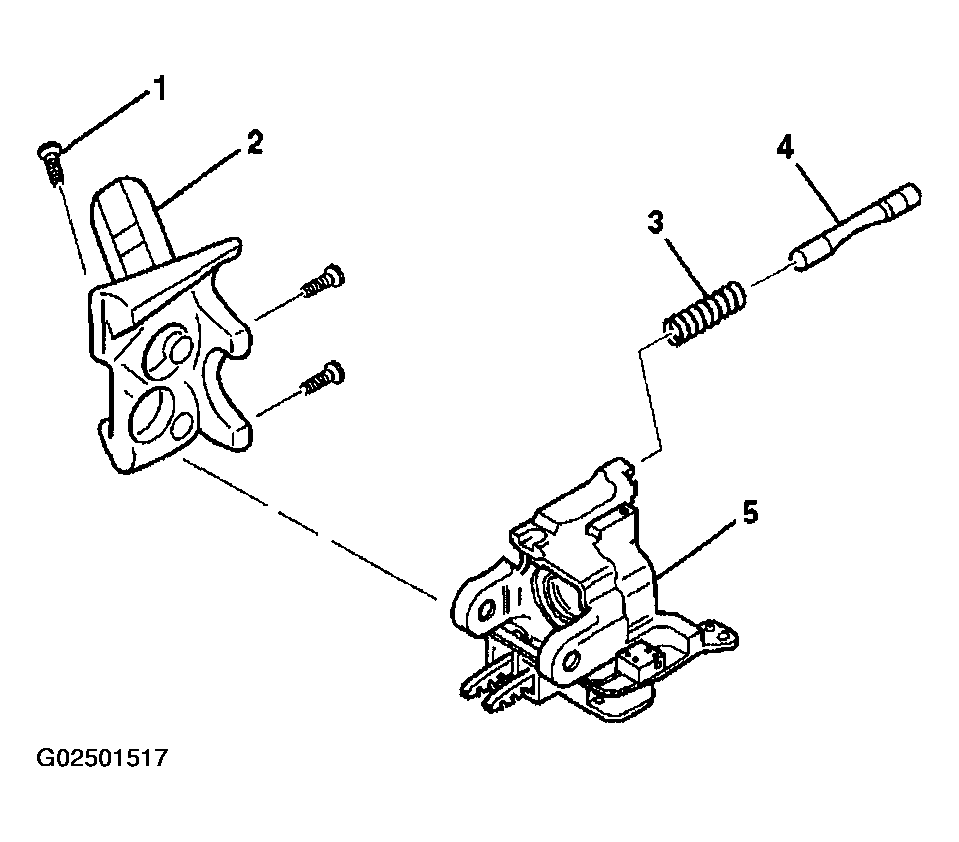 Courtesy of GENERAL MOTORS CORP.
- Place steering column lock cylinder set into the OFF position.
- Place the shift lever clevis into the PARK position.
- Press the locking tab on the end of the park lock cable assembly (1) into the slot in the electronic lock module assembly.
- Install the ignition and key alarm switch assembly only. Refer to Ignition & Key Alarm Switch Assembly - Assemble - Off Vehicle
.
- Install the upper tilt head components. Refer to Steering Column Tilt Head Housing - Disassemble - Off Vehicle
.
- Install the ignition lock cylinder. Refer to Ignition Lock Cylinder Replacement - On Vehicle
.
- Enable the inflatable restraint steering wheel module. Refer to DISABLING & ACTIVATING AIR BAG SYSTEM
.