MULTI-DISPLAY (w/Navigation System): Removal
- DISCONNECT CABLE FROM NEGATIVE BATTERY TERMINAL
- REMOVE NO. 1 SPEAKER OPENING COVER ASSEMBLY
(See
REMOVAL
)
- REMOVE NO. 3 INSTRUMENT PANEL REGISTER ASSEMBLY
(See
REMOVAL
)
- REMOVE NO. 4 INSTRUMENT PANEL REGISTER ASSEMBLY
(See
REMOVAL
)
- REMOVE MULTI-DISPLAY ASSEMBLY
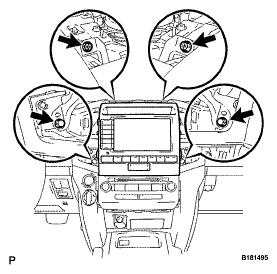
- Remove the 2 screws and 2 bolts.
 Courtesy of © TOYOTA, LICENSE AGREEMENT TMS1002
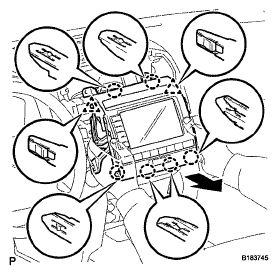
- Pull the radio receiver to detach the 2 clips and 6 claws on the backside of the display.
- Disconnect the connectors and remove the display.
 Courtesy of © TOYOTA, LICENSE AGREEMENT TMS1002
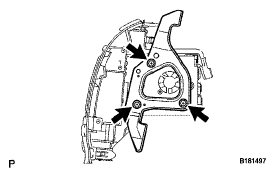
- REMOVE NO. 1 RADIO RECEIVER BRACKET
- Remove the 3 bolts and bracket.
 Courtesy of © TOYOTA, LICENSE AGREEMENT TMS1002
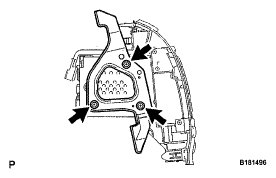
- REMOVE NO. 2 RADIO RECEIVER BRACKET
- Remove the 3 bolts and bracket.
 Courtesy of © TOYOTA, LICENSE AGREEMENT TMS1002