Television Camera: Installation
- INSTALL TELEVISION CAMERA ASSEMBLY
- Engage the 2 claws and install the television camera assembly.
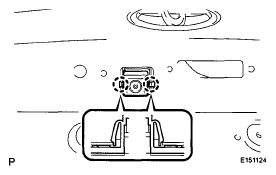 Courtesy of © TOYOTA, LICENSE AGREEMENT TMS1002
- Connect the television camera connector.
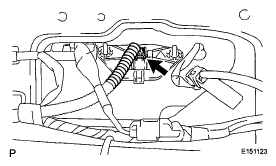 Courtesy of © TOYOTA, LICENSE AGREEMENT TMS1002
- INSTALL BACK DOOR OUTSIDE GARNISH
(See INSTALLATION
)
- INSTALL BACK DOOR TRIM PANEL ASSEMBLY
(See REASSEMBLY
)
- INSTALL ASSIST STRAP ASSEMBLY
(See REASSEMBLY
)
- INSTALL ASSIST STRAP HOLE COVER
(See REASSEMBLY
)
- INSTALL BACK DOOR LOCK COVER (for Glass Hatch Type)
(See REASSEMBLY
)
- INSTALL BACK DOOR TRIM COVER LH (w/o Power Back Door)
(See REASSEMBLY
)
- INSTALL BACK DOOR TRIM COVER LH (w/ Power Back Door)
(See REASSEMBLY
)
- CONNECT POWER BACK DOOR ROD (w/ Power Back Door)
(See REASSEMBLY
)
- INSTALL BACK DOOR SERVICE HOLE COVER LH (w/ Power Back Door)
(See REASSEMBLY
)
- INSTALL BACK DOOR TRIM COVER RH
(See REASSEMBLY
)
- INSTALL BACK WINDOW UPPER TRIM PANEL ASSEMBLY
(See REASSEMBLY
)