Navigation System (Except Hybrid): Multi-Display: Removal
- EJECT MAP DISC
- Turn the ignition switch on (ACC).
- Push the "CLOSE" button.
- Touch "MAP EJECT" on the navigation screen to eject the map disc.
- REMOVE SHIFT LEVER KNOB SUB-ASSEMBLY (for Automatic Transaxle)
(See REMOVAL
)
- REMOVE SHIFT LEVER KNOB SUB-ASSEMBLY (for Manual Transaxle)
(See REMOVAL
)
- REMOVE NO. 1 INSTRUMENT CLUSTER FINISH PANEL GARNISH
(See REMOVAL
)
- REMOVE NO. 2 INSTRUMENT CLUSTER FINISH PANEL GARNISH
(See REMOVAL
)
- REMOVE FLOOR SHIFT POSITION INDICATOR HOUSING SUB-ASSEMBLY (for Automatic Transaxle)
(See REMOVAL
)
- REMOVE UPPER CONSOLE PANEL (for Manual Transaxle)
(See REMOVAL
)
- REMOVE UPPER CONSOLE REAR PANEL SUB-ASSEMBLY (for Automatic Transaxle)
(See REMOVAL
)
- REMOVE UPPER CONSOLE REAR PANEL SUB-ASSEMBLY (for Manual Transaxle)
(See REMOVAL
)
- REMOVE UPPER CONSOLE PANEL SUB-ASSEMBLY
(See REMOVAL
)
- REMOVE INSTRUMENT PANEL NO. 2 REGISTER ASSEMBLY
(See REMOVAL
)
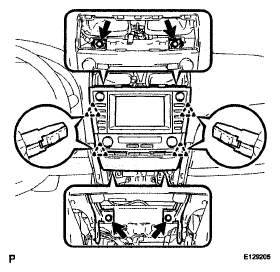
- REMOVE NAVIGATION RECEIVER WITH HEATER CONTROL PANEL ASSEMBLY
- Remove the 4 bolts.
- Pull the navigation receiver with heater control panel assembly toward the rear of the vehicle and disengage the 4 clips.
- Disconnect each connector and remove the navigation receiver with heater control panel assembly.
 Courtesy of © TOYOTA, LICENSE AGREEMENT TMS1002
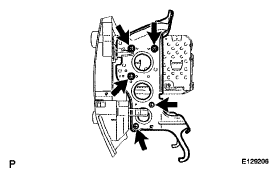
- REMOVE RADIO NO. 1 BRACKET
- Remove the 5 bolts and radio No. 1 bracket.
 Courtesy of © TOYOTA, LICENSE AGREEMENT TMS1002
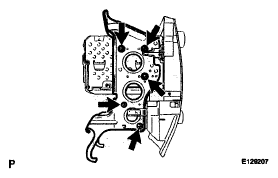
- REMOVE RADIO NO. 2 BRACKET
- Remove the 5 bolts and radio No. 2 bracket.
 Courtesy of © TOYOTA, LICENSE AGREEMENT TMS1002
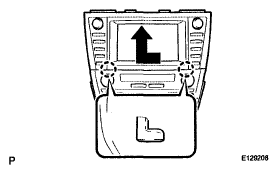
- REMOVE NAVIGATION RECEIVER ASSEMBLY
- Remove the navigation receiver assembly as shown in the illustration.
 Courtesy of © TOYOTA, LICENSE AGREEMENT TMS1002