USB port inspection
- Disconnect the negative battery terminal. (See NEGATIVE BATTERY TERMINAL DISCONNECTION/CONNECTION
.)
- Remove the following parts:
- Console up (See REAR CONSOLE REMOVAL/INSTALLATION
.)
- Auxiliary jack/USB port (See AUXILIARY JACK/USB PORT REMOVAL/INSTALLATION .)
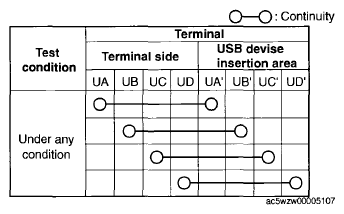
- Insert the pins to positions UA', UB', UC', and UD' shown in the figure from the side of the USB device insertion area for the auxiliary jack/USB port, and verify the continuity at the insertion side and terminal side of the USB device.
 Courtesy of MAZDA MOTORS CORP.
- Verify that the continuity at the insertion side and terminal side of the USB device is as indicated in the table.
NOTE:
- When inspecting the USB device insertion side, touch it with a paper clip or similar thin pin without directly inserting a tester into the terminals.
 Courtesy of MAZDA MOTORS CORP.
- If not as indicated in the table, replace the auxiliary jack/USB port.