USB Port Inspection
- Disconnect the negative battery cable.
- Remove the following parts:
- Remove the center console box. (See CENTER CONSOLE BOX REMOVAL/INSTALLATION
.)
- Remove the console panel. (See CONSOLE PANEL REMOVAL/INSTALLATION
.)
- Remove the auxiliary jack/USB port . (See AUXILIARY JACK/USB PORT REMOVAL/INSTALLATION .)
- Insert the pins to positions UA, UB, UC and UDshown in the figure from the side of the USB device insertion area for the auxiliary jack?USB port, and verify the continuity at the insertion side and terminal side of the USB device.
- Verify that the continuity at the insertion side and terminal side of the USB device is as indicated in the table.
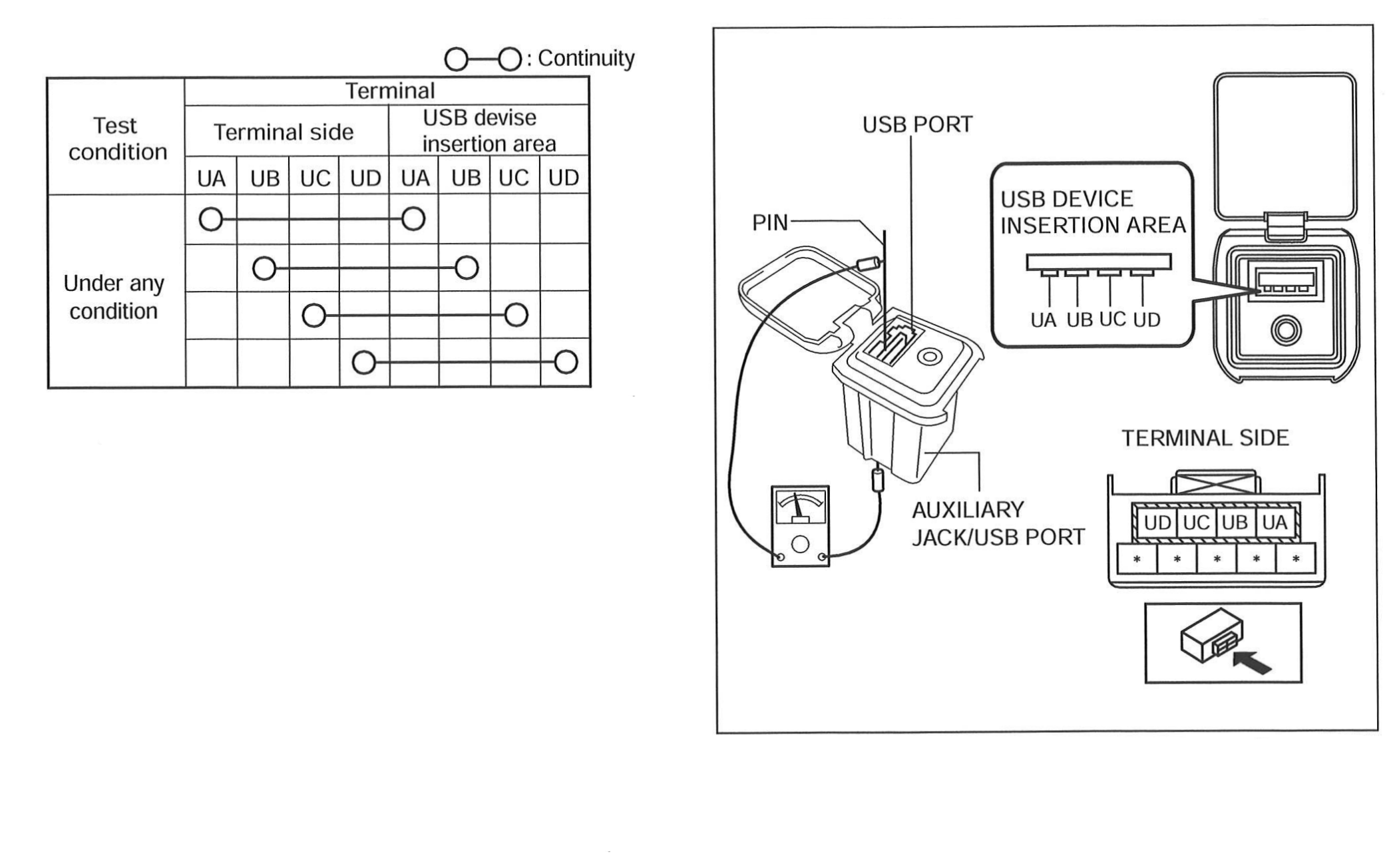 Courtesy of MAZDA MOTORS CORP.
- If not as indicated in the table, replace the auxiliary jack/USB port.