Auxiliary Jack Inspection
- Disconnect the negative battery cable.
- Remove the following parts:
- Remove the center console box. (See CENTER CONSOLE BOX REMOVAL/INSTALLATION
.)
- Remove the console panel. (See CONSOLE PANEL REMOVAL/INSTALLATION
.)
- Remove the auxiliary jack/USB port . (See AUXILIARY JACK/USB PORT REMOVAL/INSTALLATION .)
- Connect a commercially-available nonresistant plug to the auxiliary jack/USB port.
- Verify that the continuity between the auxiliary jack/USB port terminals is as indicated in the table.
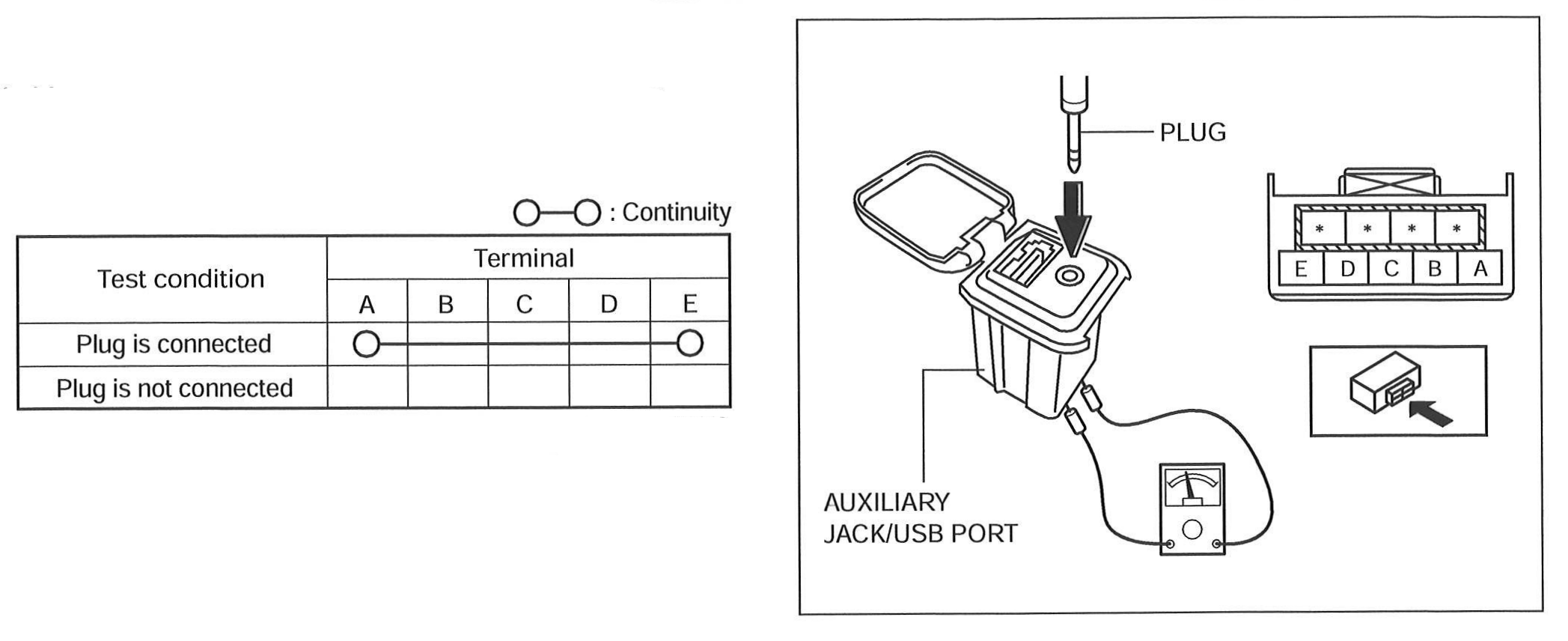 Courtesy of MAZDA MOTORS CORP.
- If not as indicated in the table, replace the auxiliary jack/USB port.