- REMOVE REMOTE TOUCH ASSEMBLY
Refer to PROCEDURE - Step 1 [10/2015 - 08/2019]
- REMOVE LOWER NO. 2 INSTRUMENT PANEL FINISH PANEL
Refer to PROCEDURE - Step 2 [10/2015 - 12/2017]
- REMOVE LOWER NO. 1 INSTRUMENT PANEL FINISH PANEL
Refer to PROCEDURE - Step 3 [10/2015 - 12/2017]
- REMOVE SHIFT LEVER KNOB SUB-ASSEMBLY
Refer to PROCEDURE - Step 4 [10/2015 - 12/2017]
- REMOVE INSTRUMENT CLUSTER FINISH PANEL ORNAMENT
Refer to PROCEDURE - Step 5 [10/2015 - 12/2017]
- REMOVE CONSOLE PANEL SUB-ASSEMBLY
Refer to PROCEDURE - Step 6 [10/2015 - 12/2017]
- REMOVE BACK-UP BATTERY WITH BRACKET
- Disconnect the connector.
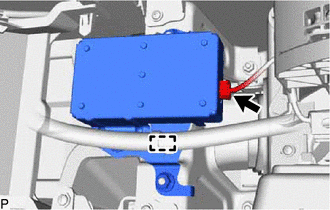 Courtesy of © TOYOTA, LICENSE AGREEMENT TMS1002 Courtesy of © TOYOTA, LICENSE AGREEMENT TMS1002
|
- Disengage the clamp.
- Remove the 2 nuts and back-up battery with bracket.
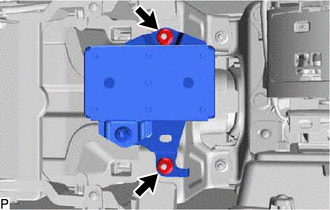 Courtesy of © TOYOTA, LICENSE AGREEMENT TMS1002 Courtesy of © TOYOTA, LICENSE AGREEMENT TMS1002
|
- REMOVE NO. 1 TELEPHONE BRACKET
- Remove the nut.
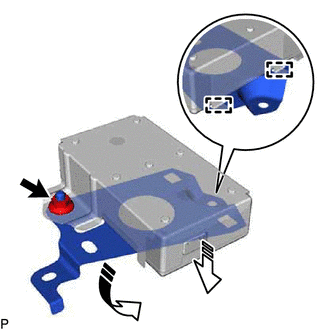 Courtesy of © TOYOTA, LICENSE AGREEMENT TMS1002 Courtesy of © TOYOTA, LICENSE AGREEMENT TMS1002
|
 |
Remove in this Direction (1) |
 |
Remove in this Direction (2) |
- Disengage the 2 guides to remove the No. 1 telephone bracket as shown in the illustration.
- REMOVE NO. 2 TELEPHONE BRACKET
- Remove the No. 2 telephone bracket as shown in the illustration.
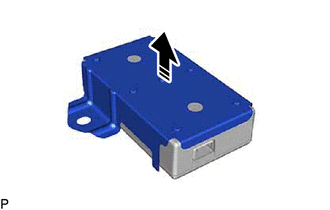 Courtesy of © TOYOTA, LICENSE AGREEMENT TMS1002 Courtesy of © TOYOTA, LICENSE AGREEMENT TMS1002
|
|
Remove in this Direction |
- REMOVE BACK-UP BATTERY