Removal
WIPER / WASHER: WASHER NOZZLE (for Front Side): REMOVAL
1. REMOVE ENGINE ROOM SIDE COVER LH Removal
2. REMOVE ENGINE ROOM SIDE COVER RH Removal
3. DISCONNECT CABLE FROM NEGATIVE BATTERY TERMINAL
NOTICE:
- w/ Navigation System:
After the engine switch is turned off, the HDD navigation system requires approximately 6 minutes to record various types of memory and settings. As a result, after turning the engine switch off, wait 6 minutes or more before disconnecting the cable from the negative (-) battery terminal.
- When disconnecting the cable, some systems need to be initialized after the cable is reconnected Repair Instruction - Initialization.
4. REMOVE UPPER RADIATOR SUPPORT SEAL Removal
5. REMOVE FRONT FENDER MAIN SEAL LH Removal
6. REMOVE FRONT FENDER MAIN SEAL RH Removal
7. REMOVE FRONT WIPER ARM LH Removal
8. REMOVE FRONT WIPER ARM RH Removal
9. REMOVE HOOD TO COWL TOP SEAL Removal
10. REMOVE COWL TOP VENTILATOR LOUVER SUB-ASSEMBLY Removal
11. REMOVE WASHER NOZZLE SUB-ASSEMBLY
HINT:
Use the same procedures to remove the other washer nozzle.
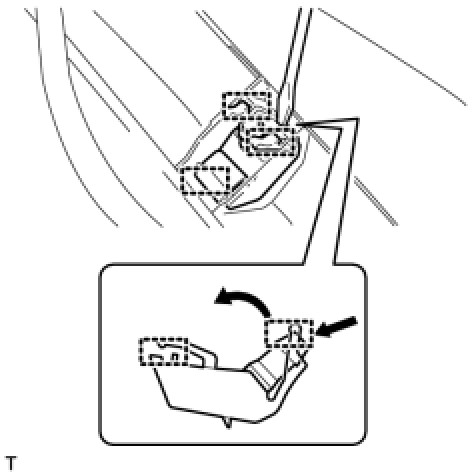
(a) Detach the 3 claws and remove the washer nozzle.
(b) Disconnect the hose.