Pinpoint Test R: The Door Ajar Warning Indicator Is Never/Always On
Instrumentation and Warning Chimes
Pinpoint Tests
Pinpoint Test R: The Door Ajar Warning Indicator Is Never/Always On
Normal Operation
The Instrument Cluster (IC) receives the driver door ajar status from the hardwired driver door switch. The IC receives all other door ajar status information from the Smart Junction Box (SJB) over the High Speed Controller Area Network (HS-CAN) communication bus. When the driver door is open, the driver door switch closes to ground signaling the IC that the driver door is open. When any other door is open, the SJB sends a door ajar message to the IC to turn on the door ajar warning indicator.
- DTC U0140 (Lost Communication With the Body Control Module [GEM]) - a continuous DTC that sets in the IC if the door ajar status message is missing for more than 5 seconds and the IC turns on the door ajar warning indicator.
This pinpoint test is intended to diagnose the following:
- Wiring, terminals or connectors
- SJB
- IC
PINPOINT TEST R: THE DOOR AJAR WARNING INDICATOR IS NEVER/ALWAYS ON
-------------------------------------------------
R1 CHECK THE INTERIOR LAMPS FOR CORRECT OPERATION
- Open and close each door while monitoring the interior lamps.
- Do the interior lamps operate correctly?
Yes
GO to R2.
No
REFER to Courtesy Lamp. Testing and Inspection
-------------------------------------------------
R2 CHECK THE DRIVER DOOR INPUT TO THE CLUSTER
- Ignition ON.
- Enter the following diagnostic mode on the scan tool: IC DataLogger.
- Select the IC door ajar switch PID (D_DR_SW_IC). Monitor the driver door ajar switch PID while opening and closing the driver door.
- Does the PID match the door position with the door open and closed?
Yes
GO to R3.
No
GO to R5.
-------------------------------------------------
R3 RETRIEVE THE RECORDED DTCs FROM THE IC SELF-TEST
- Retrieve the recorded DTCs from the IC self-test.
- Is DTC U0140 retrieved?
Yes
Go To Pinpoint Test AI. Pinpoint Tests AI: DTC U0140
No
GO to R4.
-------------------------------------------------
R4 CARRY OUT THE IC WARNING LAMP AND CHIME ACTIVE COMMAND USING THE SCAN TOOL
- Ignition ON.
- Enter the following diagnostic mode on the scan tool: IC DataLogger.
- Select the IC door ajar warning indicator (DRAJARLMP) active command. Command the door ajar warning indicator on then off again. Observe the door ajar indicator.
- Does the door ajar warning indicator illuminate when commanded on and turn off when commanded off?
Yes
INSTALL a new SJB. TEST the system for normal operation.
No
INSTALL a new IC. REFER to Instrument Cluster (IC) Instrument Cluster (IC). TEST the system for normal operation.
-------------------------------------------------
R5 CHECK THE SJB FOR AN OPEN
- Ignition OFF.
- Disconnect: SJB C2280c.
- Connect a fused jumper wire between the SJB C2280c-2, circuit CPL12 (VT/OG), harness side and ground.
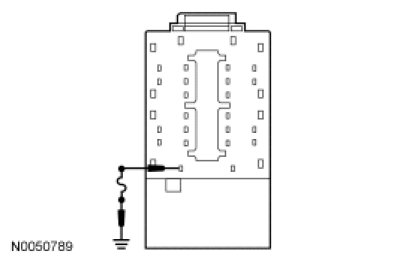
- Ignition ON.
- Enter the following diagnostic mode on the scan tool: IC DataLogger.
- Select the IC door ajar switch PID (D_DR_SW_IC). Monitor the driver door ajar switch PID.
- Does the PID indicate the door closed with the jumper wire disconnected and open with the jumper wire connected?
Yes
INSTALL a new SJB. TEST the system for normal operation.
No
REMOVE the jumper wire. GO to R6.
-------------------------------------------------
R6 CHECK CIRCUIT CPL12 (VT/OG) FOR AN OPEN
- Ignition OFF.
- Disconnect: IC C220a.
- Measure the resistance between the IC C220a-2, circuit CPL12 (VT/OG), harness side and the SJB C2280c-2, circuit CPL12 (VT/OG), harness side.
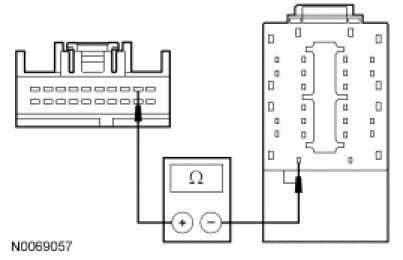
- Is the resistance less than 5 ohms?
Yes
INSTALL a new IC. REFER to Instrument Cluster (IC) Instrument Cluster (IC). TEST the system for normal operation.
No
REPAIR the circuit. TEST the system for normal operation.
-------------------------------------------------