Instrument Cluster (IC)
Instrument Cluster (IC)
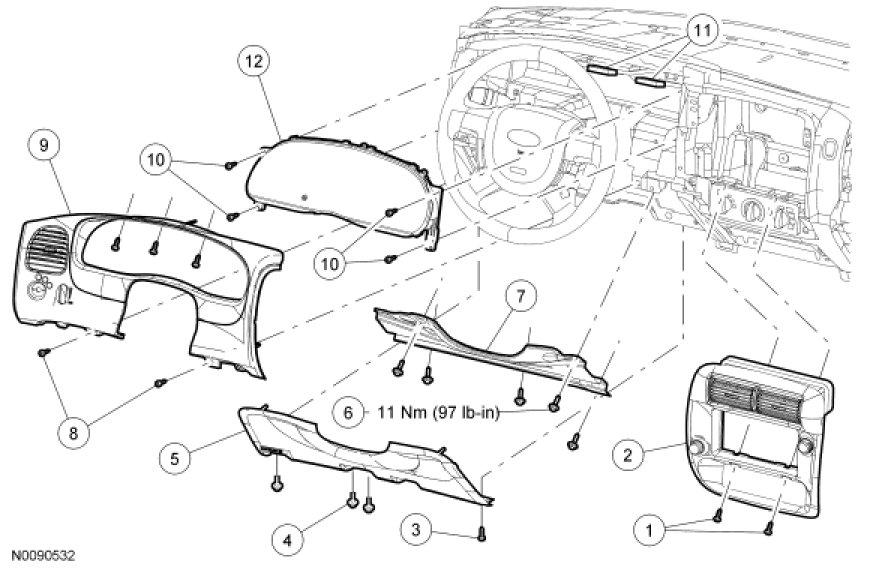
Removal
1. NOTE: If installing a new Instrument Cluster (IC), it is necessary to upload the IC configuration information to the scan tool.
Depower the Supplemental Restraint System (SRS). For additional information, refer to Air Bag Systems.
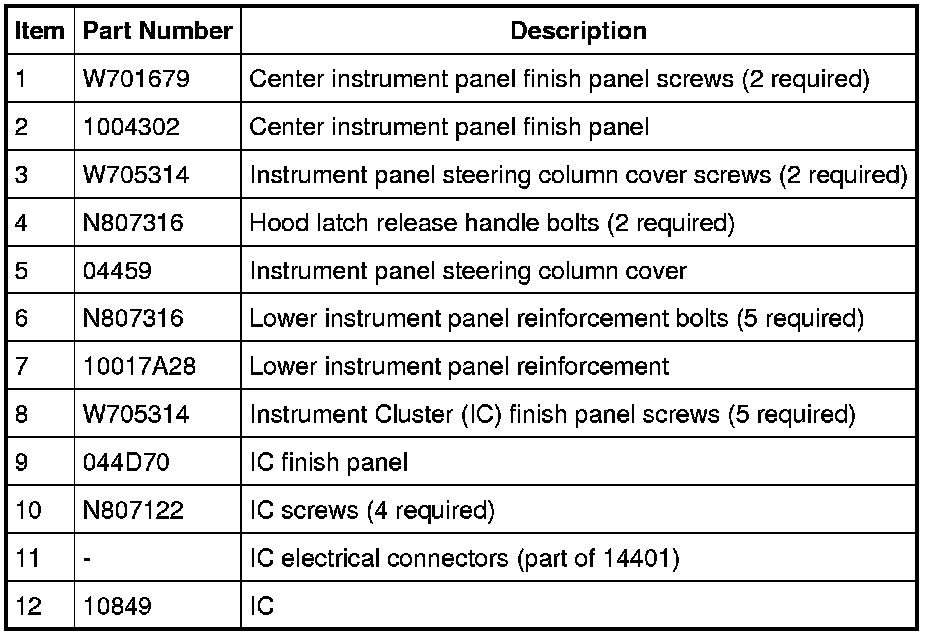
2. Remove the 2 screws and remove the center instrument panel finish panel.
- Disconnect the electrical connectors.
3. Remove the 2 screws and position aside the hood latch release handle.
4. Remove the 2 screws and remove the instrument panel steering column cover.
5. Remove the 5 bolts and the lower instrument panel reinforcement.
6. If equipped, position the column-mounted transmission range selector lever to the lowest position.
7. Remove the 5 screws and remove the IC finish panel.
- Disconnect the electrical connectors.
8. Remove the 4 IC screws.
9. If equipped with an automatic transmission, release the retaining tab and remove the transmission range indicator.
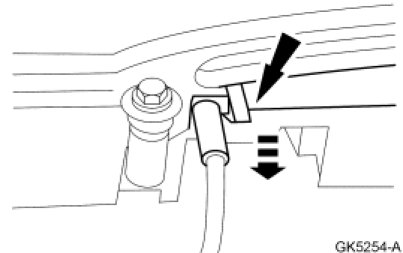
10. Disconnect the electrical connectors and remove the IC.
Installation
1. If equipped, position the column-mounted transmission range selector lever to the lowest position.
2. Position the IC and connect the electrical connectors.
3. If equipped with an automatic transmission install the transmission range indicator.
4. Install the 4 IC screws.
5. Position the IC finish panel, connect the electrical connectors and install the 5 screws.
6. Position the instrument panel reinforcement and install the 5 bolts.
- Tighten to 11 Nm (97 lb-in).
7. Position the instrument panel steering column cover and install the 2 screws.
8. Position the hood latch release handle and install the 2 screws.
9. Position the center instrument panel finish panel, connect the electrical connectors and install the 2 screws.
10. Repower the SRS. For additional information, refer to Air Bag Systems.
11. If a new IC was installed, download the IC configuration information from the scan tool to the new IC.
12. NOTE: If a new IC is installed, the IC and the PCM require a parameter reset to allow the IC and the PCM to recognize each other. Failure to carry out the parameter reset to the IC and the PCM may result in a no start condition on both Passive Anti-Theft System (PATS) and non-PATS vehicles.
NOTE: If equipped, the vehicles PATS keys must be programmed to the new IC.
Carry out the parameter reset and key programming procedure.