OPDS/ODS Unit Replacement: Installation
- Place the new OPDS/ODS unit (A) on the seat-back frame. Tighten the two screws (B), and connect the OPDS unit harness 8P/ODS unit harness 18P connector (C) and sensor connectors (D) to the OPDS/ODS unit. Reinstall the cover (E).
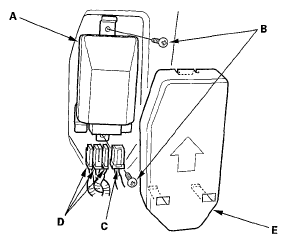 Courtesy of AMERICAN HONDA MOTOR CO., INC.
- Install the seat-back cover in the reverse order of removal.
- Install the front passenger's seat assembly (see
FRONT SEAT REMOVAL/INSTALLATION
), then connect the side airbag harness 2P connector.
- Reconnect the negative cable to the battery.
- Set the seat-back in the normal position, and make sure there is nothing on the front passenger's seat.
- Initialize the OPDS/ODS unit (see OPDS/ODS UNIT INITIALIZATION
).
- Calibrate the ODS unit ('06-08 models) (see ODS UNIT CALIBRATION
).
- After installing the OPDS/ODS unit, confirm proper system operation: Turn the ignition switch ON (II); the SRS indicator should come on for about 6 seconds and then go off.