Installing the bracket
 Courtesy of VOLVO CARS OF NORTH AMERICA.
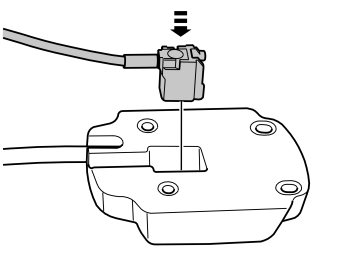
- Take the mounting plate and antenna cable from the kit.
- Press in the aerial cable connector onto the rear of the mounting plate.
 Courtesy of VOLVO CARS OF NORTH AMERICA.
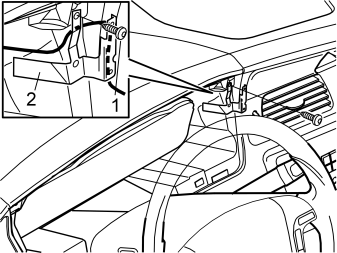
- Remove the screw (1) securing the semi-circular section of the dashboard above the combined instrument panel.
- Take the bracket (2) from the kit.
- Position the bracket with the cable routed on the reverse of the bracket as shown in the illustration.
- Tighten the bracket using the screw (1) for the semi-circular section.
- Route the cables from the mounting plate through the hole behind the instrument panel.
 Courtesy of VOLVO CARS OF NORTH AMERICA.
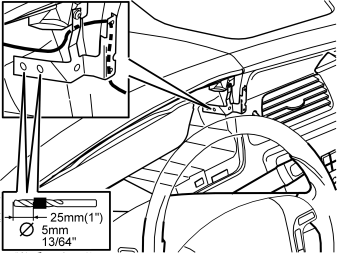
- Press the bracket against the mating surfaces where the three holes are to be drilled.
- Hold the bracket firmly in place. First drill the two marked holes through the bracket and the dashboard. Use a Ø5 mm (13/64")
diameter drill bit. Use a 25 mm (1")
diameter drill stop.
 Courtesy of VOLVO CARS OF NORTH AMERICA.
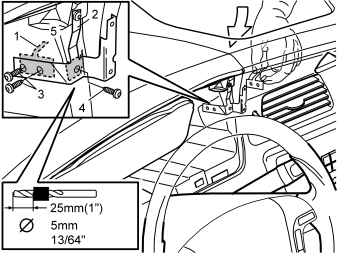
- Insert the bracing plate (1) through the hole in the dashboard.
- Secure the bracket (2) using two screws (3) from the kit while pressing the bracket against the mating surfaces.
- Tighten the screws so that the bracket is pressed into and is at the same level as the dashboard face.
- Drill out the last hole. Use a Ø5 mm (13/64")
diameter drill bit.
- Insert the bracing plate (5) through the hole in the dashboard.
- Secure the bracket using a screw (4) from the kit.
 Courtesy of VOLVO CARS OF NORTH AMERICA.
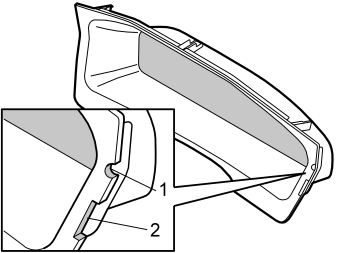
- Mark out the hole for the cables for the handset holder and bracket on the surround for the combined instrument panel.
- File out a groove for the cables for the handset holder (1) in the combined instrument panel surround. File the hole so that it is large enough for any excess wiring to be routed through the hole and hidden on the inside of the dashboard.
- File out a groove for the installed bracket (2).
- Smooth off the edges of the groove.
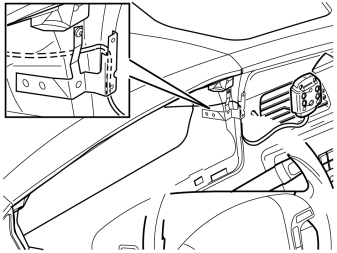 Courtesy of VOLVO CARS OF NORTH AMERICA.
- Route the cables from the mounting plate in the hole behind the combined instrument panel so that the handset holder can be positioned.
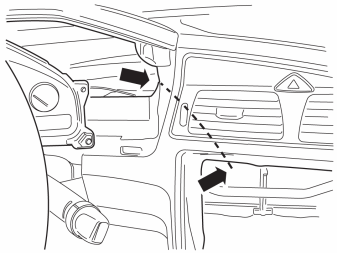 Courtesy of VOLVO CARS OF NORTH AMERICA.
- Route the cables from the mounting plate through the hole behind the combined instrument panel in to the center console.