Fiber-Optic Cable, Disconnecting From Wiring Harness Connector
WARNING: This page is about a different variant/trim than selected.
Removing
-- Unplug connector for fiber optic cable from appropriate control unit.
-- Release the locking mechanism in the fiber-optic cable connector -1- by pushing on it.
-- Release the secondary lock -2- with a small screwdriver.
-- Remove the fiber-optic cable.
CAUTION:
- Install the cap on the trunk, in order to protect the fiber-optic cable from dust and dirt.
- Use a new housing since it is likely that the secondary lock was damaged during the removal of the fiber-optic cable.
- Note the arrows for allocation on the base module "IN" and "OUT".
Installing
Install in reverse order of removal. Note the following:
-- Install the fiber-optic cable according to the markings.
NOTE:
 Courtesy of VOLKSWAGEN UNITED STATES, INC.
Push the corrugated tube into the connector housing until it audibly engages.
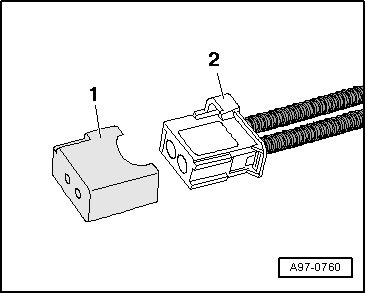
Seal open harness connector -2- for fiber-optic cable using Protective Cap For Cable Connector -VAS 6223/9- -item 1-.
Fig 2: Identifying Fiber-Optic Cable Harness Connector And Protective Cap For Cable Connector VAS 6223/9
Protective cap prevents contamination of or mechanical damage to end face of fiber optic cable which would impair signal transmission.