Removal [12/2021 - ]: Procedure
WARNING: This page is about a different variant/trim than selected.
- REMOVE SHIFT LEVER KNOB SUB-ASSEMBLY
- for Automatic Transaxle:
- for HV Model:
- REMOVE UPPER CONSOLE PANEL SUB-ASSEMBLY
- Lift up in the direction indicated by the arrow shown in the illustration to detach the claw and clip and remove the upper console panel sub-assembly.
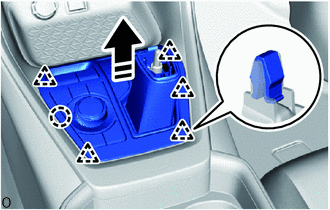 Courtesy of © TOYOTA, LICENSE AGREEMENT TMS1002 Courtesy of © TOYOTA, LICENSE AGREEMENT TMS1002
|
 |
Remove in this Direction |
- Disconnect the 2 connectors.
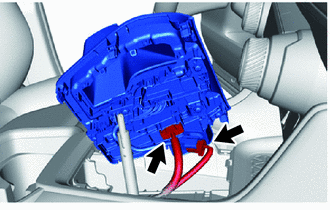 Courtesy of © TOYOTA, LICENSE AGREEMENT TMS1002 Courtesy of © TOYOTA, LICENSE AGREEMENT TMS1002
|
- REMOVE MOBILE WIRELESS CHARGER CRADLE ASSEMBLY (w/ Wireless Charger)
Refer to PROCEDURE - Step 3
- REMOVE UPPER CONSOLE BOX (w/o Wireless Charger)
- Rotate in the direction indicated by the arrow (1) shown in the illustration to detach the clip.
 Courtesy of © TOYOTA, LICENSE AGREEMENT TMS1002 Courtesy of © TOYOTA, LICENSE AGREEMENT TMS1002
|
|
Remove in this Direction (1) |
 |
Remove in this Direction (2) |
- Pull in the direction indicated by the arrow (2) shown in the illustration to detach the guide and remove the upper console box.
- Detach the clamp and disconnect the 2 connectors.
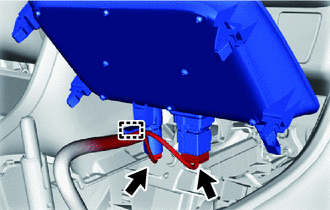 Courtesy of © TOYOTA, LICENSE AGREEMENT TMS1002 Courtesy of © TOYOTA, LICENSE AGREEMENT TMS1002
|
- REMOVE REAR UPPER CONSOLE PANEL SUB-ASSEMBLY
- Remove the bolt.
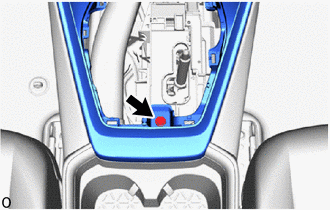 Courtesy of © TOYOTA, LICENSE AGREEMENT TMS1002 Courtesy of © TOYOTA, LICENSE AGREEMENT TMS1002
|
- Place your hand at the position shown in the illustration and lift up in the direction indicated by the arrow to detach the clip.
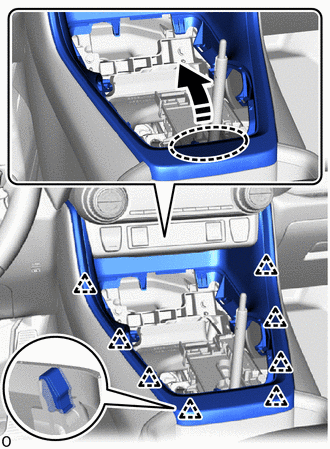 Courtesy of © TOYOTA, LICENSE AGREEMENT TMS1002 Courtesy of © TOYOTA, LICENSE AGREEMENT TMS1002
|
 |
Place Hand Here |
|
Remove in this Direction |
- Pull in the direction indicated by the arrow shown in the illustration to detach the guide and remove the rear upper console panel sub-assembly.
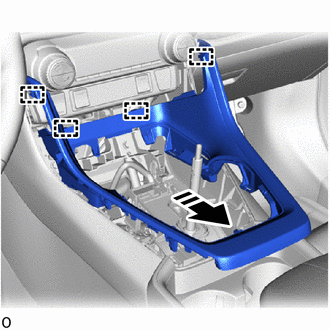 Courtesy of © TOYOTA, LICENSE AGREEMENT TMS1002 Courtesy of © TOYOTA, LICENSE AGREEMENT TMS1002
|
|
Remove in this Direction |
- REMOVE CONSOLE CUP HOLDER BOX SUB-ASSEMBLY
- Place both hands at the position shown in the illustration and lift up in the direction indicated by the arrow to detach the clip and guide and remove the console cup holder box sub-assembly.
 Courtesy of © TOYOTA, LICENSE AGREEMENT TMS1002 Courtesy of © TOYOTA, LICENSE AGREEMENT TMS1002
|
|
Place Hands Here |
|
Remove in this Direction |
- w/ Illumination:
- Disconnect the connector.
 Courtesy of © TOYOTA, LICENSE AGREEMENT TMS1002 Courtesy of © TOYOTA, LICENSE AGREEMENT TMS1002
|
- REMOVE REAR CONSOLE END PANEL SUB-ASSEMBLY
- Pull in the direction indicated by the arrow to detach the clip and claw.
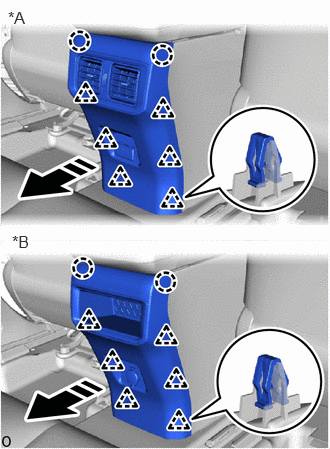 Courtesy of © TOYOTA, LICENSE AGREEMENT TMS1002 Courtesy of © TOYOTA, LICENSE AGREEMENT TMS1002
|
| *A |
w/ Rear Register Duct |
| *B |
w/o Rear Register Duct |
|
Remove in this Direction |
- Disconnect each connector and remove the rear console end panel sub-assembly.
- REMOVE FRONT NO. 2 CONSOLE BOX INSERT
- Rotate in the direction indicated by the arrow (1) shown in the illustration to detach the clip.
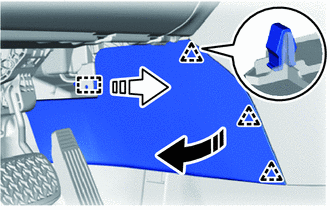 Courtesy of © TOYOTA, LICENSE AGREEMENT TMS1002 Courtesy of © TOYOTA, LICENSE AGREEMENT TMS1002
|
|
Remove in this Direction (1) |
|
Remove in this Direction (2) |
- Pull in the direction indicated by the arrow (2) shown in the illustration to detach the guide and remove the front No. 2 console box insert.
- REMOVE FRONT NO. 1 CONSOLE BOX INSERT
- Rotate in the direction indicated by the arrow (1) shown in the illustration to detach the clip.
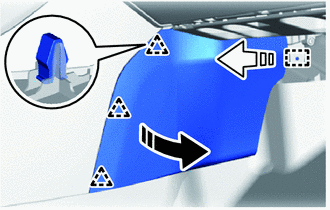 Courtesy of © TOYOTA, LICENSE AGREEMENT TMS1002 Courtesy of © TOYOTA, LICENSE AGREEMENT TMS1002
|
|
Remove in this Direction (1) |
|
Remove in this Direction (2) |
- Pull in the direction indicated by the arrow (2) shown in the illustration to detach the guide and remove the front No. 1 console box insert.
- REMOVE CONSOLE BOX POCKET (w/ Console Box Tray)
- Remove the console box pocket.
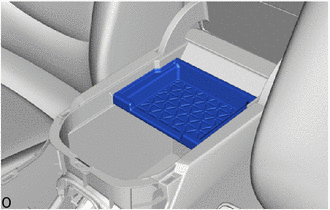 Courtesy of © TOYOTA, LICENSE AGREEMENT TMS1002 Courtesy of © TOYOTA, LICENSE AGREEMENT TMS1002
|
- REMOVE CONSOLE BOX CARPET
- Remove the console box carpet.
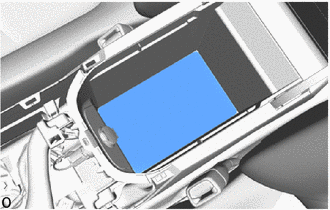 Courtesy of © TOYOTA, LICENSE AGREEMENT TMS1002 Courtesy of © TOYOTA, LICENSE AGREEMENT TMS1002
|
- REMOVE CONSOLE BOX ASSEMBLY
- Detach the clamp and remove the 2 bolts.
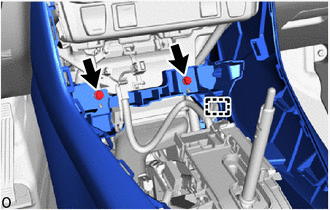 Courtesy of © TOYOTA, LICENSE AGREEMENT TMS1002 Courtesy of © TOYOTA, LICENSE AGREEMENT TMS1002
|
- Disconnect each connector.
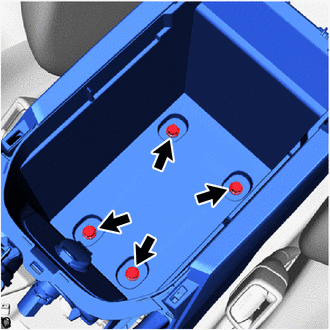
- Remove the 4 bolts.
 Courtesy of © TOYOTA, LICENSE AGREEMENT TMS1002 Courtesy of © TOYOTA, LICENSE AGREEMENT TMS1002
|
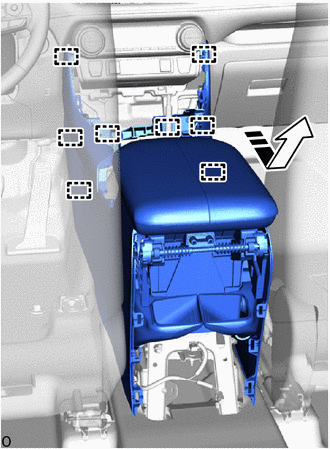
- While avoiding the shift lever, pull in the direction indicated by the arrow shown in the illustration to detach the guide and remove the console box assembly.
 Courtesy of © TOYOTA, LICENSE AGREEMENT TMS1002 Courtesy of © TOYOTA, LICENSE AGREEMENT TMS1002
|
|
Remove in this Direction |