- REMOVE LOWER INSTRUMENT PANEL FINISH PANEL LH
Refer to PROCEDURE - Step 3
- REMOVE LOWER INSTRUMENT PANEL FINISH PANEL RH
Refer to PROCEDURE - Step 4
- REMOVE FRONT CONSOLE UPPER PANEL GARNISH
Refer to PROCEDURE - Step 5
- REMOVE CONSOLE BOX POCKET SUB-ASSEMBLY
Refer to PROCEDURE - Step 6
- REMOVE CENTER INSTRUMENT CLUSTER FINISH PANEL SUB-ASSEMBLY
Refer to PROCEDURE - Step 7
- REMOVE CENTER NO. 1 INSTRUMENT CLUSTER FINISH PANEL
Refer to PROCEDURE - Step 13 [04/2018 - 08/2021]
, or refer to PROCEDURE - Step 13 [08/2021 -]
- REMOVE CENTER NO. 2 INSTRUMENT CLUSTER FINISH PANEL
Refer to PROCEDURE - Step 14 [04/2018 - 08/2021]
, or refer to PROCEDURE - Step 14 [08/2021 -]
- REMOVE RADIO AND DISPLAY RECEIVER ASSEMBLY WITH BRACKET
Refer to PROCEDURE - Step 9
- REMOVE NO. 2 HEATER TO REGISTER DUCT SUB-ASSEMBLY
Refer to PROCEDURE - Step 16 [04/2018 - 08/2021]
, or refer to PROCEDURE - Step 16 [08/2021 -]
- REMOVE DCM (TELEMATICS TRANSCEIVER) WITH BRACKET
- w/o Navigation System:
- Disconnect the connector.
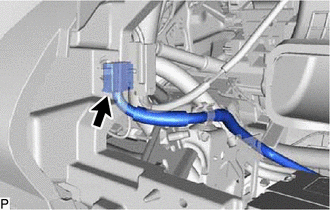 Courtesy of © TOYOTA, LICENSE AGREEMENT TMS1002 Courtesy of © TOYOTA, LICENSE AGREEMENT TMS1002
|
- Remove the 2 nuts and pull the DCM (telematics transceiver) with bracket as shown in the illustration.
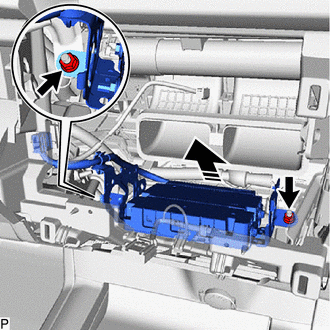 Courtesy of © TOYOTA, LICENSE AGREEMENT TMS1002 Courtesy of © TOYOTA, LICENSE AGREEMENT TMS1002
|
 |
Remove in this Direction |
- Disconnect each connector and remove the DCM (telematics transceiver) with bracket.
- w/ Navigation System:
- Disconnect the 2 connectors.
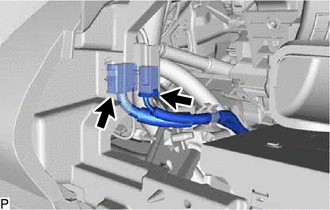 Courtesy of © TOYOTA, LICENSE AGREEMENT TMS1002 Courtesy of © TOYOTA, LICENSE AGREEMENT TMS1002
|
- Remove the 2 nuts and pull the DCM (telematics transceiver) with bracket as shown in the illustration.
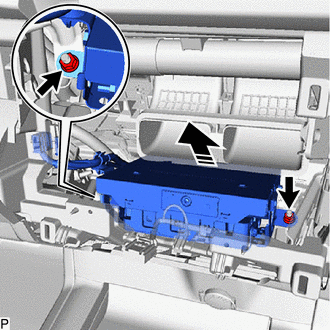 Courtesy of © TOYOTA, LICENSE AGREEMENT TMS1002 Courtesy of © TOYOTA, LICENSE AGREEMENT TMS1002
|
|
Remove in this Direction |
- Disconnect each connector and remove the DCM (telematics transceiver) with bracket.
- REMOVE TELEPHONE AND GPS ANTENNA CORD
See step 11 [08/2020 - 08/2021] See step 11 [08/2021 -]
- REMOVE NO. 2 TELEPHONE BRACKET
- w/o Navigation System:
- Disengage the wiring harness clamp.
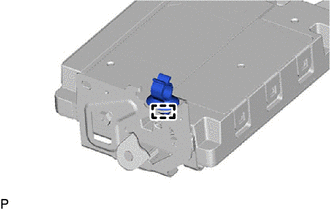 Courtesy of © TOYOTA, LICENSE AGREEMENT TMS1002 Courtesy of © TOYOTA, LICENSE AGREEMENT TMS1002
|
- Remove the screw and disengage the 2 guides to remove the No. 2 telephone bracket.
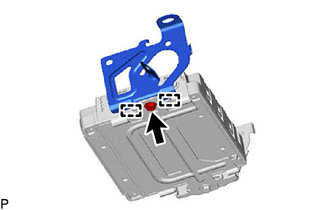 Courtesy of © TOYOTA, LICENSE AGREEMENT TMS1002 Courtesy of © TOYOTA, LICENSE AGREEMENT TMS1002
|
- w/ Navigation System:
- Disengage the clamp.
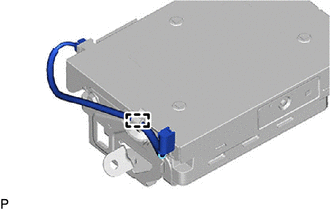 Courtesy of © TOYOTA, LICENSE AGREEMENT TMS1002 Courtesy of © TOYOTA, LICENSE AGREEMENT TMS1002
|
- Disengage the wiring harness clamp.
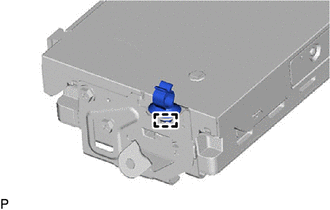 Courtesy of © TOYOTA, LICENSE AGREEMENT TMS1002 Courtesy of © TOYOTA, LICENSE AGREEMENT TMS1002
|
- Remove the 3 screws and disengage the 3 guides to remove the No. 2 telephone bracket.
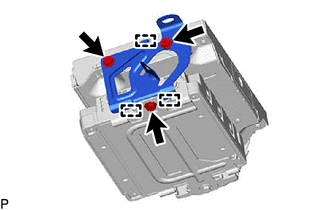 Courtesy of © TOYOTA, LICENSE AGREEMENT TMS1002 Courtesy of © TOYOTA, LICENSE AGREEMENT TMS1002
|
- REMOVE NO. 1 TELEPHONE BRACKET
- w/o Navigation System:
- Remove the screw and disengage the 2 guides to remove the No. 1 telephone bracket.
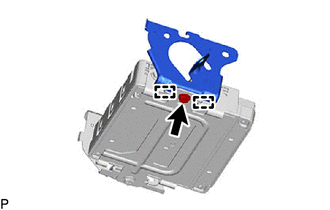 Courtesy of © TOYOTA, LICENSE AGREEMENT TMS1002 Courtesy of © TOYOTA, LICENSE AGREEMENT TMS1002
|
- w/ Navigation System:
- Remove the 3 screws and disengage the 3 guides to remove the No. 1 telephone bracket.
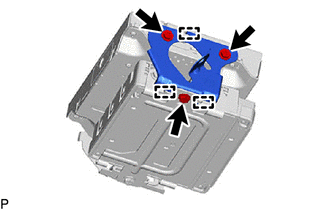 Courtesy of © TOYOTA, LICENSE AGREEMENT TMS1002 Courtesy of © TOYOTA, LICENSE AGREEMENT TMS1002
|
- REMOVE NAVIGATION ECU WITH ANTENNA CORD (w/ Navigation System)
- REMOVE DCM (TELEMATICS TRANSCEIVER) ASSEMBLY
- REMOVE NO. 3 TELEPHONE BRACKET
- Remove the 4 screws and No. 3 telephone bracket.
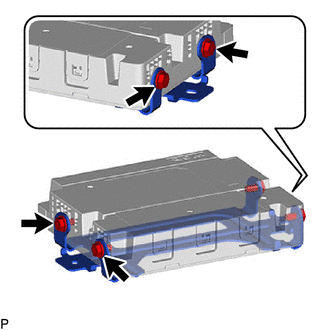 Courtesy of © TOYOTA, LICENSE AGREEMENT TMS1002 Courtesy of © TOYOTA, LICENSE AGREEMENT TMS1002
|
- REMOVE DCM (TELEMATICS TRANSCEIVER)