LEMON Manuals
: Even more car manuals for everyone
Home
>>
Toyota
>>
2017
>>
4Runner TRD Pro
>>
Repair and Diagnosis
>>
Accessories & Equipment
>>
Interior/Illumination Lights
>>
Lighting System (Int) - Service Information
>>
ROOM LIGHT (for Front)
>>
Removal [08/2015 - ]
>>
Procedure
Removal [08/2015 - ]: Procedure
REMOVE DRIVE MONITOR SWITCH (w/ Drive Monitor Switch)
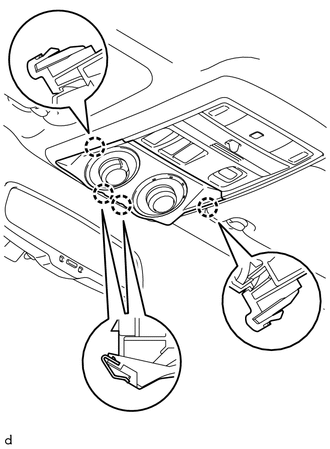
Detach the 4 claws to remove the drive monitor switch.
Courtesy of © TOYOTA, LICENSE AGREEMENT TMS1002
Disconnect the connector.
REMOVE MAP LIGHT ASSEMBLY
Open the cover (w/o Drive Monitor Switch).
Remove the 2 screws.
Courtesy of © TOYOTA, LICENSE AGREEMENT TMS1002
Detach the 2 clips to remove the map light assembly.
Disconnect the connector.
REMOVE MAP LIGHT BULB
Turn the 2 sockets in the direction indicated by the arrows to remove them.
Courtesy of © TOYOTA, LICENSE AGREEMENT TMS1002
Remove the 2 map light bulbs from the sockets.
 Courtesy of © TOYOTA, LICENSE AGREEMENT TMS1002