Fan - Backrest - Driver Seat - Remove And Replace: Remove
- Open the LH front door.
- Lower the LH windows.
- Remove the driver headrest trim. See TRIM - HEADREST - DRIVER (REMOVE AND REPLACE) .
- Move the driver seat back to its original position.
- Disconnect LV power. See LV Power (Disconnect and Connect)
.
- Release the clips (x6) that attach the driver seat back shell from the seat assembly, and then separate the shell from the assembly for access to the driver seat backrest fan.
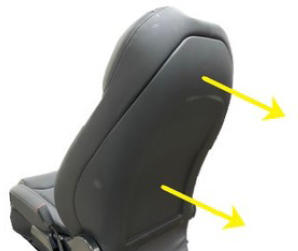 Courtesy of TESLA, INC. Courtesy of TESLA, INC.
|
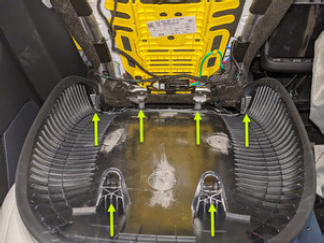 Courtesy of TESLA, INC. Courtesy of TESLA, INC.
|
- Disconnect the fan controller electrical connector, and then slide the connector upward to release it from the seat back suspension.
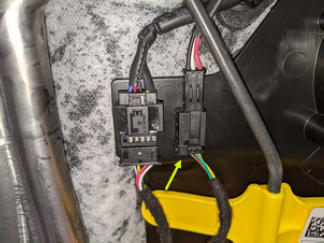 Courtesy of TESLA, INC. Courtesy of TESLA, INC.
|
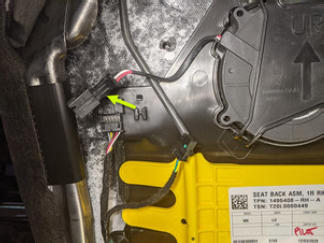 Courtesy of TESLA, INC. Courtesy of TESLA, INC.
|
- Release the tabs (x4) that attach the fan cover to the seat back, and then remove the driver seat backrest fan from the seat back.
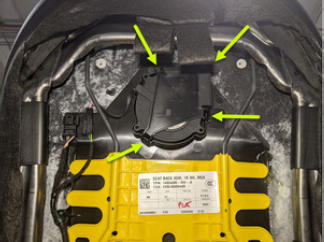 Courtesy of TESLA, INC. Courtesy of TESLA, INC.
|
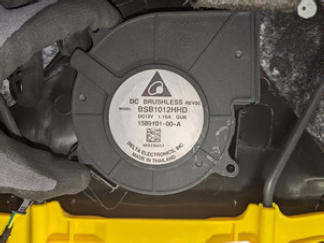 Courtesy of TESLA, INC. Courtesy of TESLA, INC.
|