Trim - Middle - Instrument Panel - RH - Remove And Replace: Remove
- Open the RH front door and lower the RH front window.
- Move the front passenger seat fully rearward.
- Open the glove box.
- Open the hood.
- Disconnect LV power. See LV POWER (DISCONNECT AND CONNECT)
.
- Remove the RH middle A-pillar trim. See TRIM - A-PILLAR - MIDDLE - LH (REMOVE AND REPLACE)
.
- Remove the RH instrument panel end cap. See END CAP - INSTRUMENT PANEL - LH (REMOVE AND REPLACE) .
- Remove the center console phone dock as an assembly, but do not remove the inductive charger from the phone dock. See PHONE DOCK - CENTER CONSOLE (REMOVE AND REPLACE)
.
- Remove the instrument panel service panel as an assembly, but do not remove the cabin temperature sensor fan from the service panel. See SERVICE PANEL - INSTRUMENT PANEL (REMOVE AND REPLACE)
.
- Remove the touchscreen as an assembly, but do not remove the display mechanism from the touchscreen. See TOUCHSCREEN (HW3) (REMOVE AND REPLACE)
.
- Release the tabs (x4) that attach the instrument panel closeout panel to the instrument panel, and then remove the closeout panel from the vehicle.
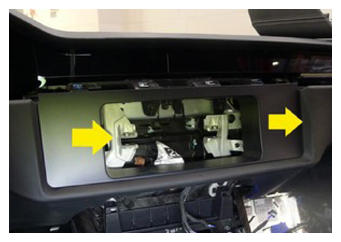 Courtesy of TESLA, INC. Courtesy of TESLA, INC.
|
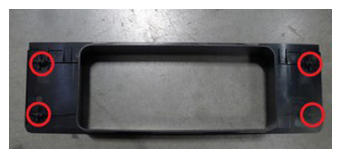 Courtesy of TESLA, INC. Courtesy of TESLA, INC.
|
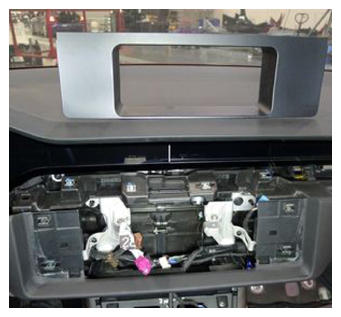 Courtesy of TESLA, INC. Courtesy of TESLA, INC.
|
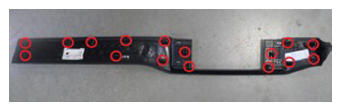
- Release the tabs (x14) that attach the RH instrument panel middle trim to the instrument panel, and then remove the trim from the vehicle.
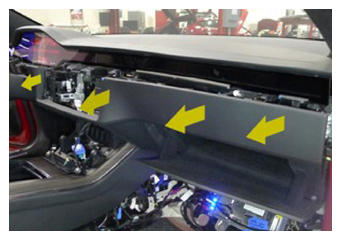 Courtesy of TESLA, INC. Courtesy of TESLA, INC.
|
 Courtesy of TESLA, INC. Courtesy of TESLA, INC.
|