IP Carrier - Remove And Replace: Removal
- Position the vehicle so that both front doors can be fully opened.
- Move the driver's seat fully rearwards.
- Move the passenger's seat fully rearwards.
- Move the steering column to the lowest position, and fully extended.
- Open the glove box.
- Disconnect 12V power. See Disconnect 12V Power
.
- Remove the defrost mesh grille assembly, refer to ASSEMBLY - MESH GRILLE - DEFROST (REMOVE AND REPLACE) .
- Remove the touchscreen Media Control Unit (Remove And Install)
.
- Remove the glove box assembly, refer to GLOVE BOX (REMOVE AND REPLACE) .
- Make sure that the front wheels are in the straight ahead position.
- Working from the driver's footwell, remove the bolts that attach the steering column to the IP carrier bracket:
- Vehicles built before April 11, 2016: upper and lower fasteners - torque 30 N.m
- Vehicles built on or after April 11, 2016:
- Upper fasteners - torque 30 N.m
- Lower fasteners - torque 17 N.m
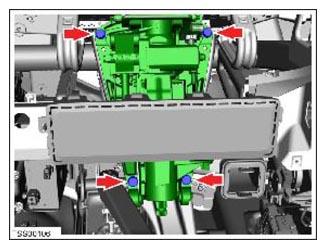 Courtesy of TESLA, INC. Courtesy of TESLA, INC.
|
- Remove the screws (x15) that attach the IP carrier to the dash frame (torque 2 N.m).
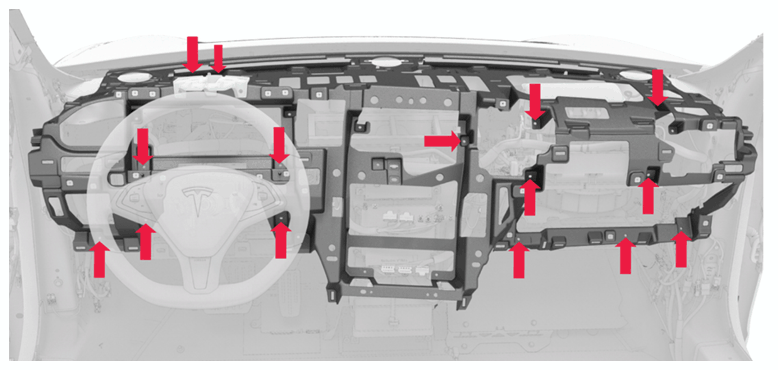 Courtesy of TESLA, INC. Courtesy of TESLA, INC.
|
- Remove the IP carrier from the dash frame.