GPS Antenna: Removal
- Disconnect the ground terminal from battery sensor. Ref. to
BATTERY
- Remove the combination meter assembly. Ref. to
REMOVAL
, Combination Meter.
- Remove the center grille assembly. Ref. to
CENTER GRILLE ASSEMBLY
, REMOVAL, Air Vent Grille.
- Remove the heater control assembly. Ref. to
REMOVAL
, Center Console.
- Remove the audio assembly or navigation assembly. Ref. to
REMOVAL , Audio.
- Remove the GPS antenna assembly.
- Disconnect the GPS antenna assembly connector on the audio unit or navigation unit side, and tie a string to the connector.
NOTE:
- A string makes operation easier during installation.
- For the model with telematics, also tie a string to the connector on the data communication module side.
- Remove the screw and harness clamp, and pull out the GPS antenna assembly from the combination meter side.
- Model without telematics
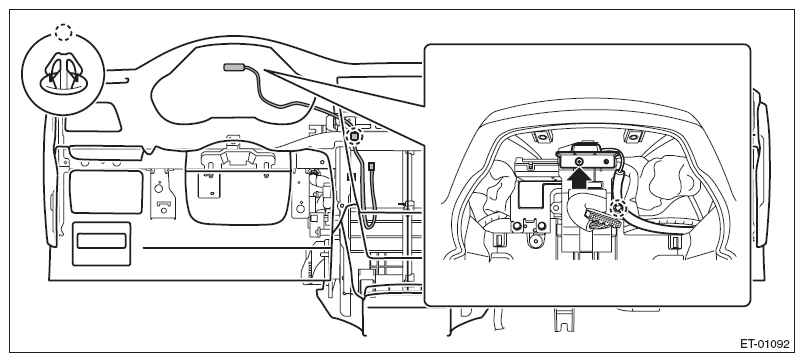 Courtesy of SUBARU OF AMERICA, INC.
- Model with telematics
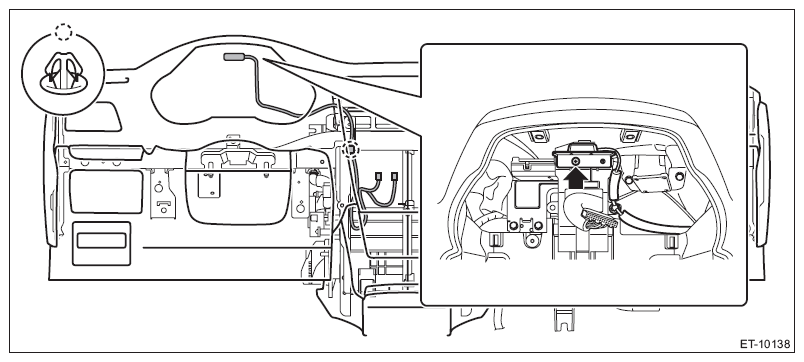 Courtesy of SUBARU OF AMERICA, INC.
- When the GPS antenna assembly is pulled out, remove the string attached to the connector in step 1.