Check Using The DTC Check Sheet
- DTC check sheet for data non-arrival detection
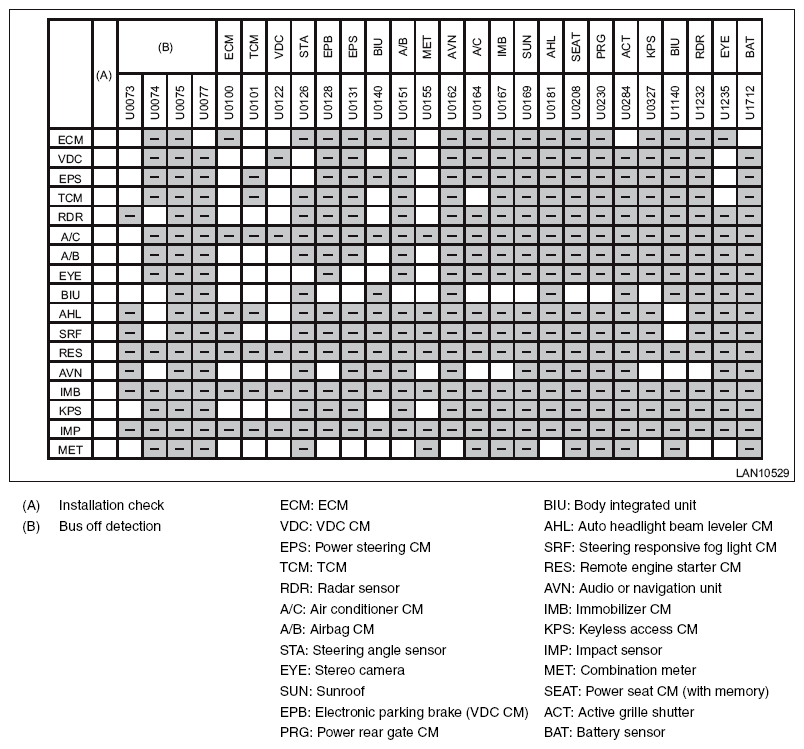 Courtesy of SUBARU OF AMERICA, INC.
- DTC check sheet for error detection
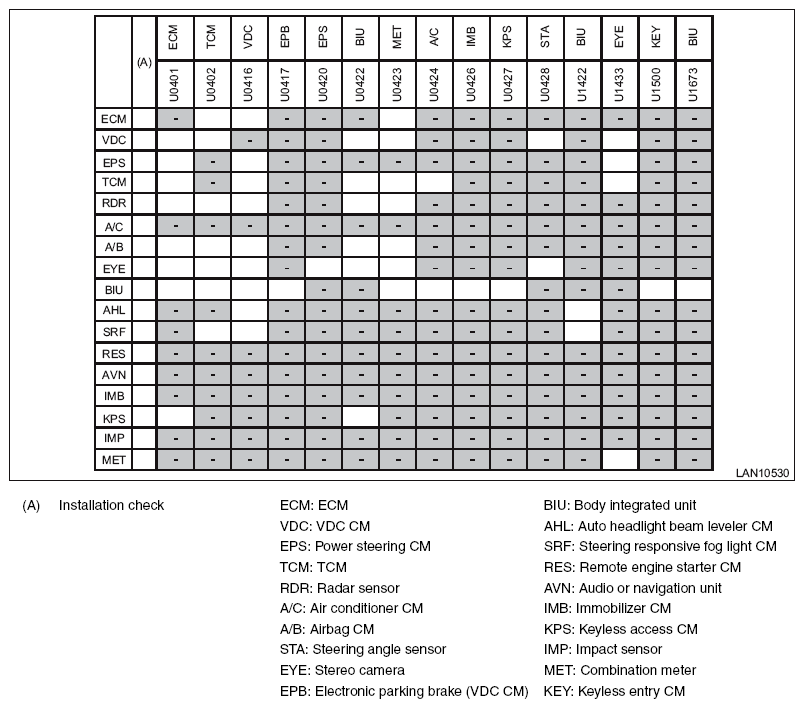 Courtesy of SUBARU OF AMERICA, INC.
- Module installation check
- Write "-" marks in the field for installation check if the vehicle to be inspected does not have relevant module.
- Write "-" marks in all blank fields on the same row that the "-" mark has filled in.
- Bus off detection/data not received
NOTE:
It becomes impossible for CAN diagnostic module to read DTC, if there is a current malfunction of open harness (data not received). If this occurs, perform the "Check using the check sheet of communication for initializing" <Ref. to
CHECK USING THE CHECK SHEET OF COMMUNICATION FOR INITIALIZING , COMMUNICATION FOR INITIALIZING IMPOSSIBLE, Subaru Select Monitor.>, and use this sheet to confirm that the corresponding part becomes the past malfunction.
- Mark "X" in the field corresponding to the DTCs that has been detected by each module in the check sheet.
- Identify and repair the faulty part by referring to the example of DTC data not received and the DTC matrix. <Ref. to
EXAMPLE OF DTC DATA NOT RECEIVED , LIST, List of Diagnostic Trouble Code (DTC).> <Ref. to
DTC MATRIX , LIST, List of Diagnostic Trouble Code (DTC).>
- Data abnormal detection
NOTE:
If any "BUS OFF" or "NO-RECEIVE DATA" condition is detected, perform the diagnosis for these problems first.
- If several modules detect the DTC for the same module, replace the detected module.
- If one module detects the DTC, replace the module of the detected side.
- If it does not return to the normal operation, re-install the module which has been replaced, and replace the module of the detected side.
- If it does not return to the normal operation, replace both modules.