MULTIFUNCTION Switch: Removal
- Set front wheels in straight-ahead position. Before proceeding, disable air bag system. See appropriate AIR BAG RESTRAINT SYSTEMS article. Turn ignition switch to LOCK position. Remove air bag module and steering wheel. See STEERING WHEEL
.
- Remove SIR coil assembly. See appropriate AIR BAG RESTRAINT SYSTEMS article. Remove Data Link Connector (DLC) screws. Pull steering column filler panel forward and set down. Disconnect hood release cable. Pull hood release handle forward, remove cable, and slide pin out.
- Remove steering column filler panel. Disconnect multifunction switch connectors. See Fig 1
. Remove multifunction switch assembly.
- To install, reverse removal procedure. Tighten screws to specification. See TORQUE SPECIFICATIONS
.
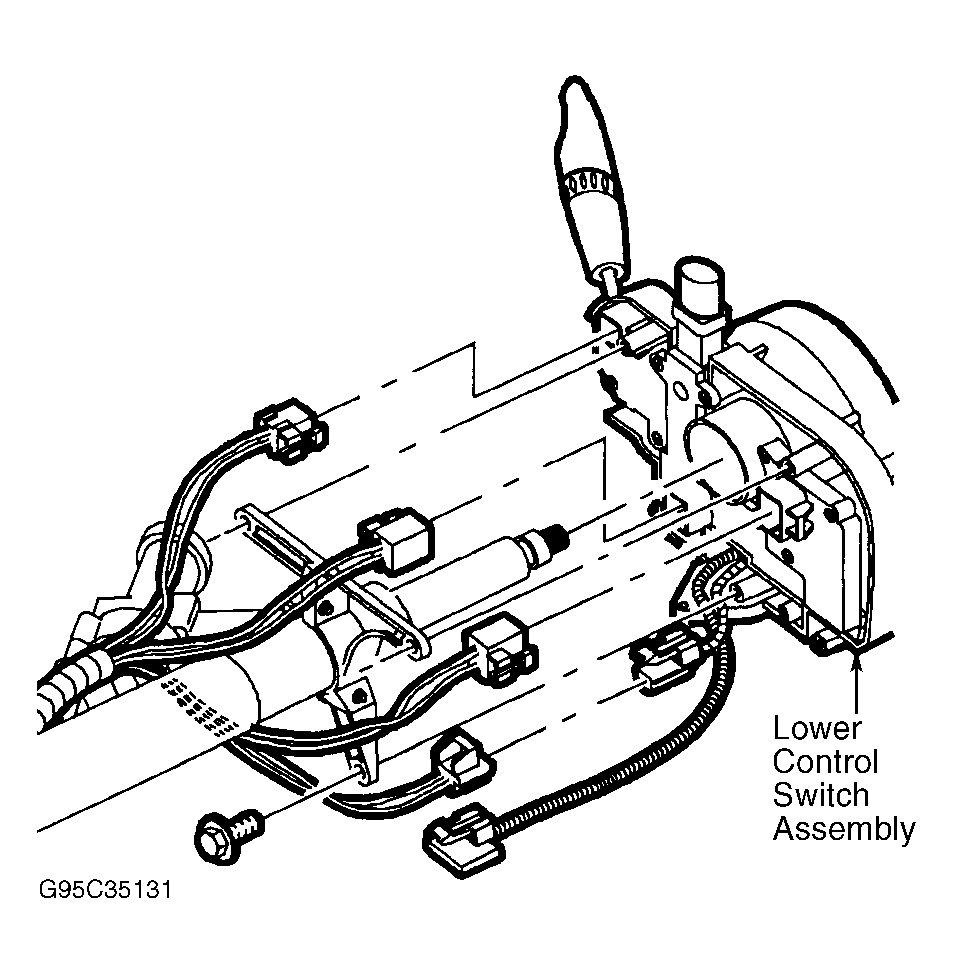 Courtesy of GENERAL MOTORS CORP.