Component Tests: Tachometer
- Using Tech 1 scan tool, select READ VALUES and ENGINE RPM. Start engine. Increase and decrease engine speed. If scan tool indicates RPM signal is correct, go to step 4
. If scan tool does not indicate an RPM signal, go to next step.
- Disconnect Main Instrument Unit (MIU) 22-pin connector. See Fig 1
. Connect test light between 22-pin MIU connector terminal No. 12 (Green/Red wire) and ground. Operate starter motor for 10 seconds. If test light flashes, go to step 4
. If test light does not flash, go to next step.
- Check Green/Red wire between 22-pin MIU connector terminal No. 12 and Trionic module terminal No. 58. Trionic module is located under right side of instrument panel. Repair as necessary. After repair, go to next step. If wiring is okay, go to next steep.
- Clear DTCs. Using scan tool, perform functional check. If tachometer operates, system is okay. If tachometer does not operate, replace Trionic module. See TRIONIC MODULE
under REMOVAL & INSTALLATION.
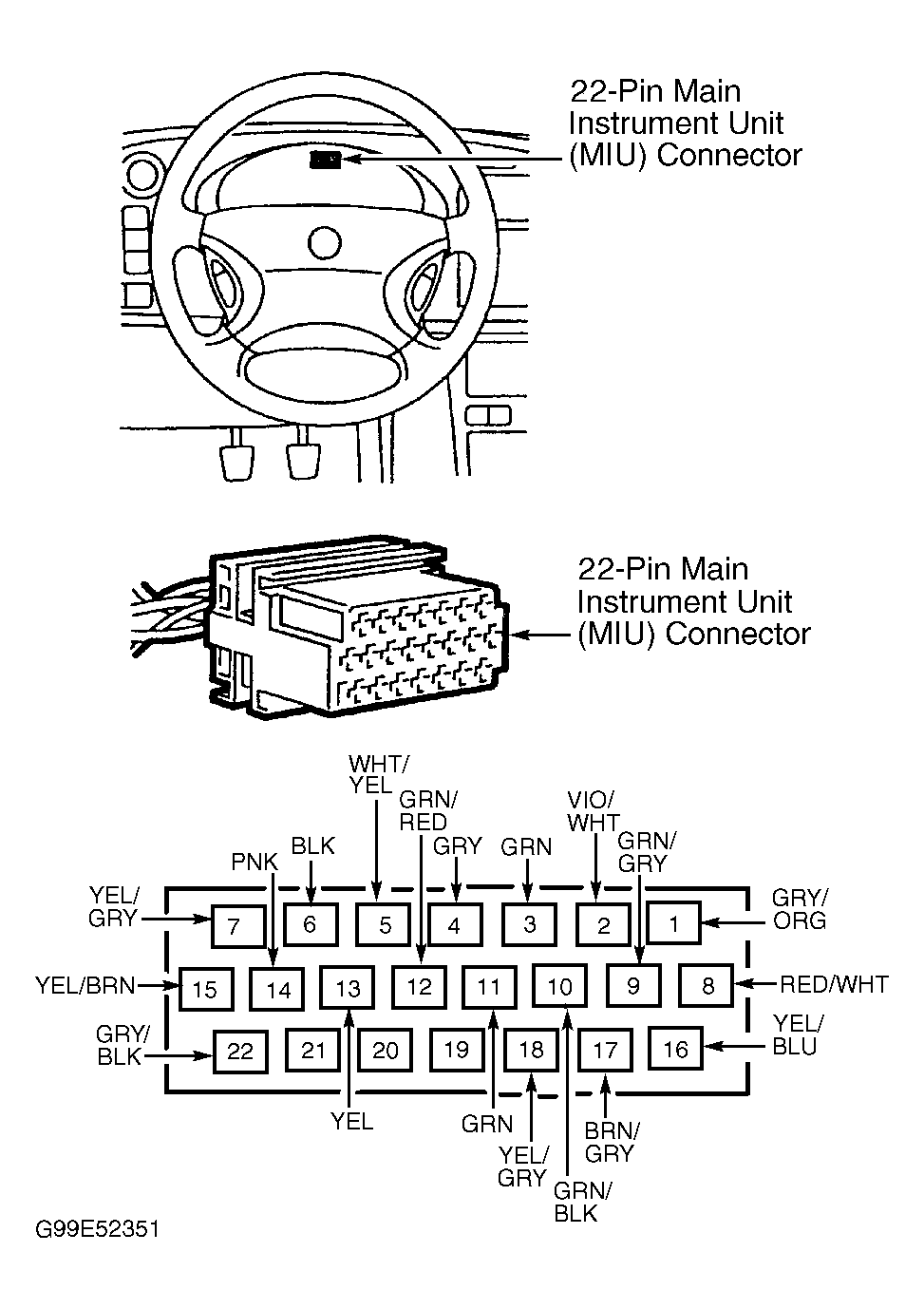 Courtesy of SAAB-SCANIA OF AMERICA, INC.