Installing Optical Contacts On Connector Side
Information
Do not remove dust boot until just before connecting contacts.
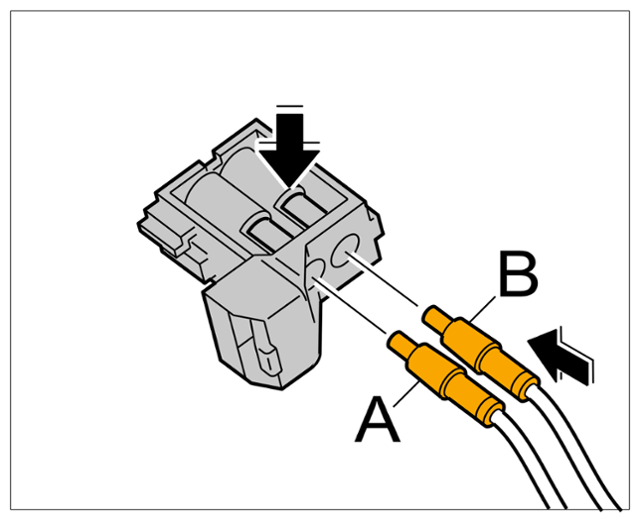
- Press optical contacts -A and B-
into the connector housing until they engage securely and close the primary lock.
 Courtesy of PORSCHE CARS NORTH AMERICA, INC. Courtesy of PORSCHE CARS NORTH AMERICA, INC.
|
Primary lock
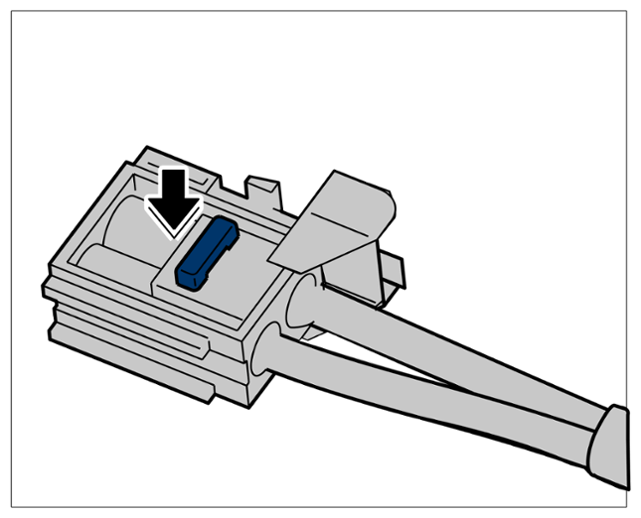
- Close the secondary lock -Arrow-
and check that the optical contacts are fitted securely.
 Courtesy of PORSCHE CARS NORTH AMERICA, INC. Courtesy of PORSCHE CARS NORTH AMERICA, INC.
|
Secondary lock