Removing GPS Antenna
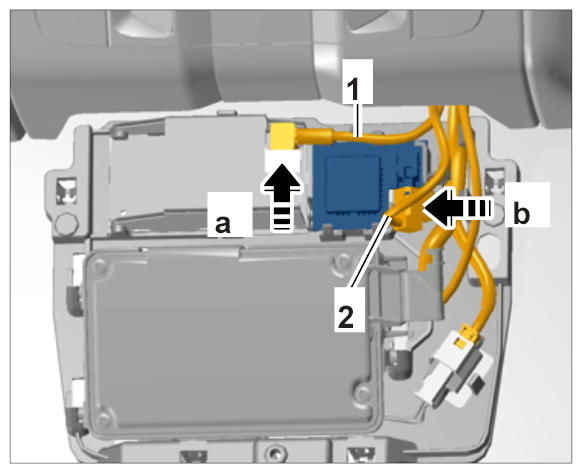
- Disconnect antenna line -1-
at the GSM antenna.
- 1.1. Release electric plug connection -a-
and disconnect it.
- 1.2. Move antenna line aside.
- Disconnect antenna line -2-
at the GPS antenna.
- 2.1. Pull slide lock approx. 2 mm out of the connector.
- 2.2. Press slide lock -b-
and disconnect electric plug connection.
- 2.3. Move antenna line aside.
 Courtesy of PORSCHE CARS NORTH AMERICA, INC.
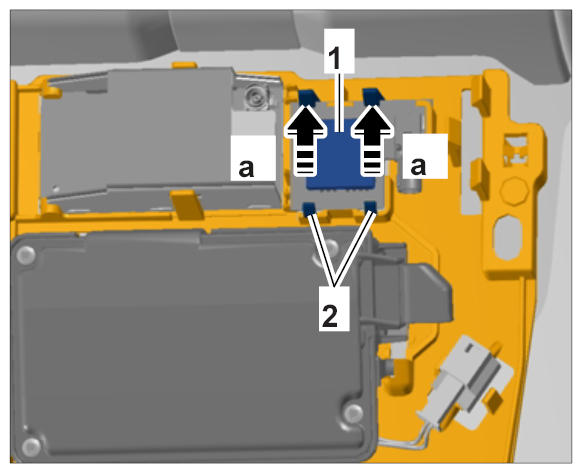
- Remove GPS antenna -1-
from its holder.
- 3.1. Carefully release locking mechanisms at the top -a-
.
- 3.2. Remove GPS antenna from the retaining lugs -2-
.
 Courtesy of PORSCHE CARS NORTH AMERICA, INC.