Removing Mobile Communication Antenna
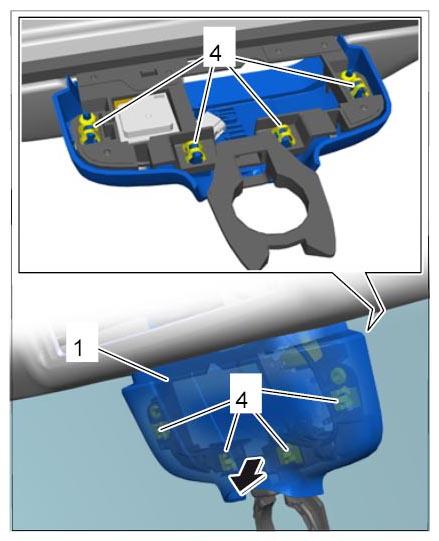
- Unclip cover -1-
on GPS antenna -arrow-
.
 Courtesy of PORSCHE CARS NORTH AMERICA, INC.
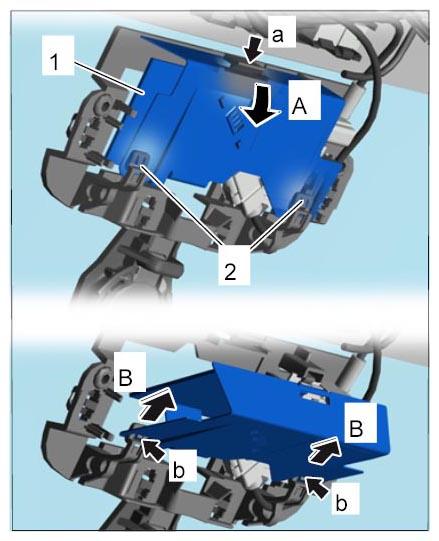
- Remove mobile communication antenna.
- 2.1. Release mobile communication antenna -1-
(-a-
and -1-
) and swivel it out by approx. 90° -A-
.
- 2.2. Release mobile communication antenna -1-
(-b-
) and pull it off the plastic clips -2-
(-B-
).
 Courtesy of PORSCHE CARS NORTH AMERICA, INC.
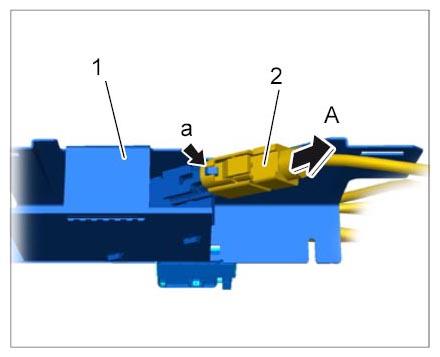
- Release antenna connector -2-
for the mobile communication antenna -1-
(-a-
) and unplug it -A-
.
 Courtesy of PORSCHE CARS NORTH AMERICA, INC.