Installing Main Wiring Harness - Dashboard Area
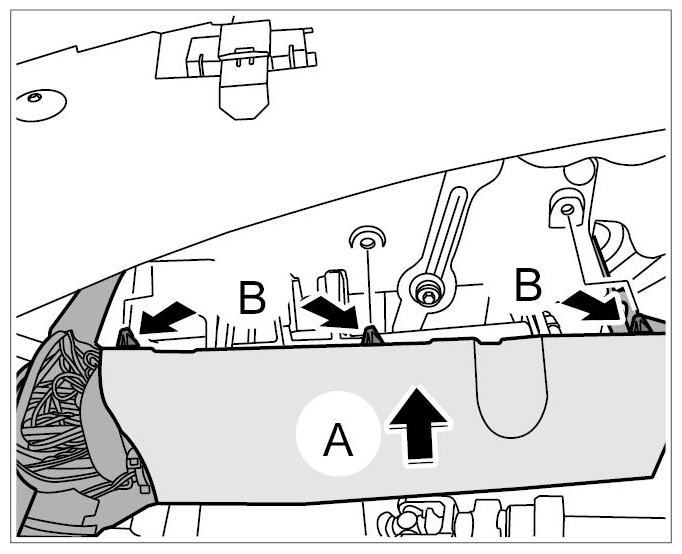
- Press wire harness with wiring duct into pedal block -Arrow A-
until locking tabs -B-
are felt to engage.
 Courtesy of PORSCHE CARS NORTH AMERICA, INC.
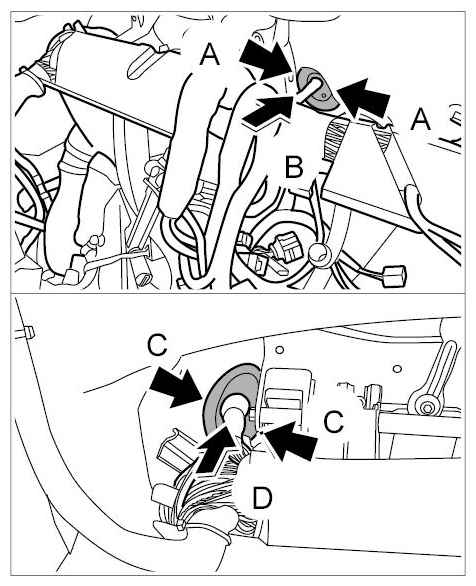
- Apply a suitable rubber lubricant (tyre mounting paste) to rim of centre rubber sleeve -A-
and press in rubber sleeve until it is felt to engage in the firewall. -Arrow B-
.
 Courtesy of PORSCHE CARS NORTH AMERICA, INC.
- Apply a suitable rubber lubricant (tyre mounting paste) to rim of left rubber sleeve -C-
and press in rubber sleeve until it is felt to engage in the firewall -Arrow D-
.
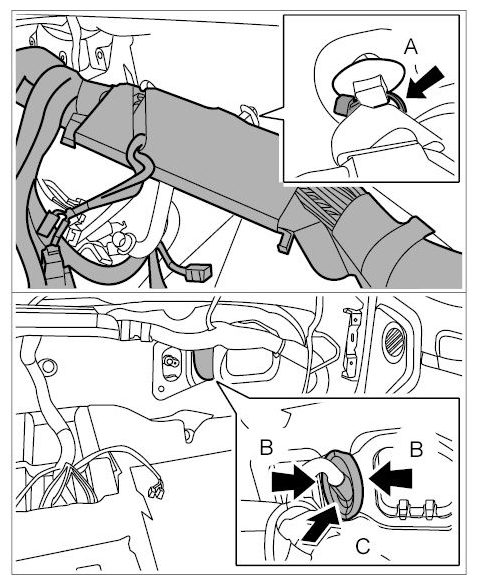
- Fasten line to the clip with a new tie-wrap -A-
.
 Courtesy of PORSCHE CARS NORTH AMERICA, INC.
- Apply a suitable rubber lubricant (tyre mounting paste) to rim of right rubber sleeve -B-
and press in rubber sleeve until it is felt to engage in the firewall -Arrow C-
.