Installing A-pillar Moulding
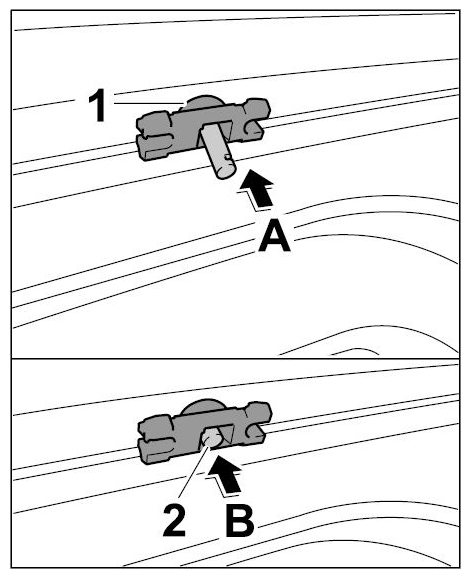
- Install new retaining clips.
 Courtesy of PORSCHE CARS NORTH AMERICA, INC.
- 1.1. Press retaining clip -1-
into the body -arrow A-
.
- 1.2. Press in expanding pin -2-
(-arrow B-
).
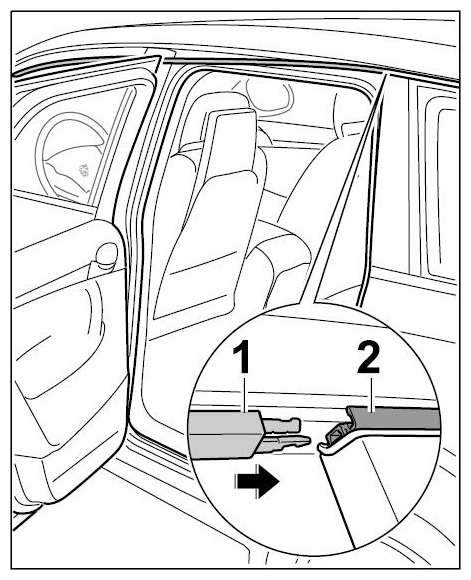
- Slide A-pillar moulding -1-
at the rear into the side window trim frame -2-
(-arrow-
) until it clicks into place.
 Courtesy of PORSCHE CARS NORTH AMERICA, INC.
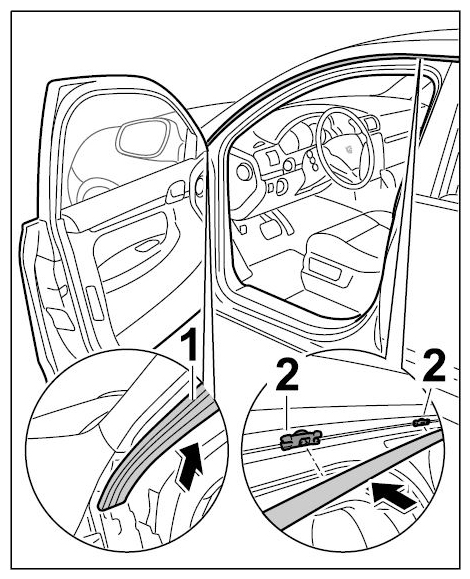
- Position A-pillar moulding -1-
on the body and press it into the retaining clips -2-
(-arrows-
) until it clicks into place.
 Courtesy of PORSCHE CARS NORTH AMERICA, INC.