Installing Mobile Communication Antenna
- Push connector of mobile communication antenna onto the line -arrow A-
until the locking lugs of the mobile communication antenna lock -arrows B-
engage securely.
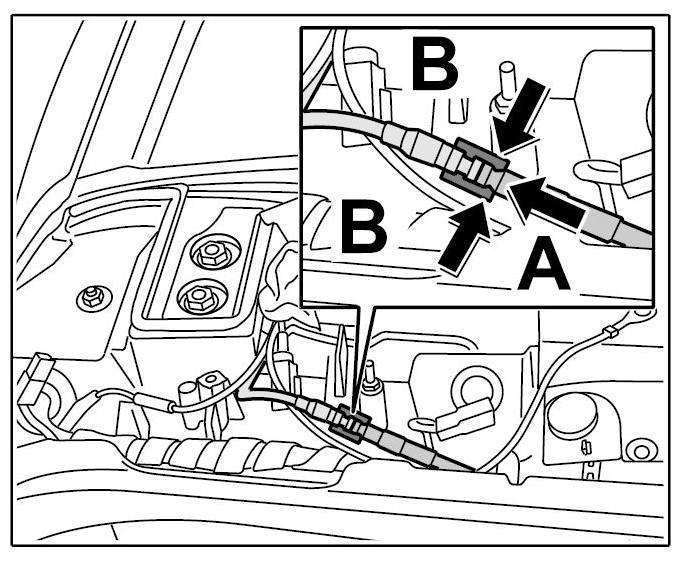 Courtesy of PORSCHE CARS NORTH AMERICA, INC.
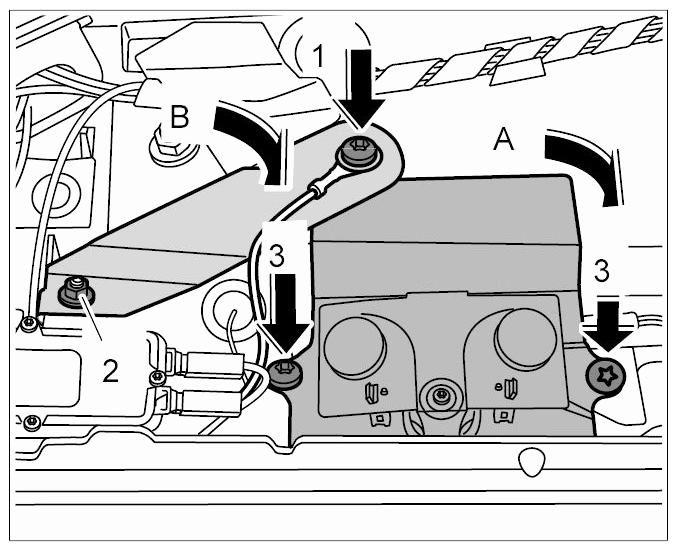
- Position mobile communication antenna in installation position -arrow A-
and screw in the fastening screws -arrows 3-
, but do not tighten them.
 Courtesy of PORSCHE CARS NORTH AMERICA, INC.
- Turn ground strap into installation position -arrow B-
and secure the ground leads using the fastening screw -arrow 1-
. Then tighten the fastening nut -2-
and fastening screws -arrows 3-
.