Removing and installing the front disc brake pads: Removal
- Remove the retainer (safety bracket) -arrow-
and extract the retainer pin inwards.
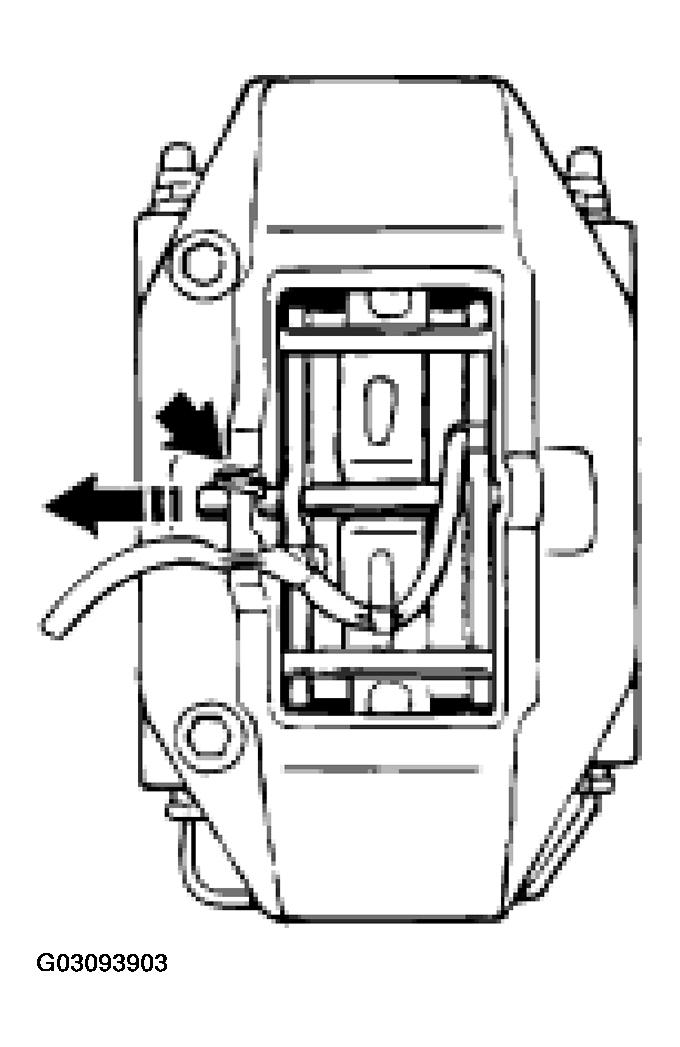 Courtesy of PORSCHE OF NORTH AMERICA, INC.
- Pull out the warning contact wire on the brake caliper and remove the warning contacts from the brake pad plates.
- Pull out the warning contact wire on the brake caliper and remove the warning contacts from the brake pad plates.
NOTE:
- Replace warning contacts if the core of the wire is worn or worn through!
- The warning contact can continue to be used if there are only scrape marks on the plastic part of the warning contact!
- If necessary, remove some brake fluid by suction from the brake fluid reservoir (brake fluid may escape over the rim of the container!)!
- Remove brake pads with a brake pad puller. Always observe the following important points!
- Set back the brake pads as far as possible with the piston resetting fixture (press back)!
- Pull out brake pads together with the vibration dampers! If this is not possible (depending on wear of the brake pads), use a spatula to detach the vibration dampers from the brake pad backing plate before removing the pads!