Removal Procedure
- Remove the instrument panel pad. Refer to Trim Pad Replacement - Instrument Panel (I/P) Upper .
 Courtesy of GENERAL MOTORS CORP.
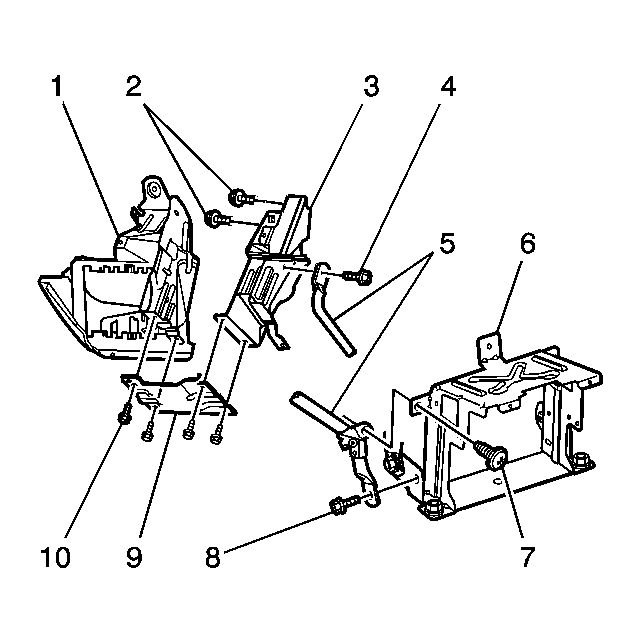
- Remove the screw (7) attaching the center support brace assembly (5) to the lower radio bracket (6).
- Remove the bolt (8) attaching the center support brace assembly (5) to the lower radio bracket (6).
- Remove the 4 bolts (10) attaching the drivers knee bolster bracket (9) to the drivers inner bracket (3) and outer bracket (1).
- Remove the drivers knee bolster bracket (9) from the drivers inner bracket (3) and outer bracket (1).
- Remove the 2 bolts (2) attaching the drivers inner bracket (3) to the vehicle.
- Remove the drivers inner bracket (3) from the vehicle.
- Remove the bolt (4) attaching the center support brace (5) to the drivers inner bracket (3).
- Remove the center support brace (5) from the drivers inner bracket (3).