Luggage Carrier - Rattling Noise
File In Section: 08 - Body and AccessoriesBulletin No.: 01-08-67-002
Date: June, 2001
TECHNICAL
Subject:
Rattle From Luggage Carrier Area Under Certain Wind Conditions
(Replace Crossbars)
Models:
2001 Pontiac Aztek
Condition
Some customers may comment that under certain cross wind or windy conditions there is a rattle coming from the luggage carrier area. Changing the position of the luggage carrier crossbars may change the noise but not eliminate it entirely. A looseness may be felt in the crossbar latches on vehicles exhibiting the rattle condition.
Cause
Tension may be inadequate in the springs located in the crossbar latches.
Correction
Replace the luggage carrier crossbars that have modified latches. The latches have been modified through the removal of 1.5 mm (.06 in) of material to prevent overcamming and damage to the spring.
Use the following procedure to replace the luggage carrier crossbar.
1. Remove the luggage carrier side rail trim covers from the rear of the rails using a small flat bladed tool.
2. Release the latches that attach the crossbars to the side rails to unlock them from the side rails.
3. Remove the crossbars from the side rails by sliding them rearward.
4. Install the new crossbars into the luggage carrier side rails.
5. Slide the crossbars to their desired position.
6. Lock the latches on the crossbars to lock them to the side rails.
7. Install the luggage carrier side trim covers to the rear of the side rails, pressing until fully seated.

Parts Information
Parts are currently available from GMSPO.
Warranty Information
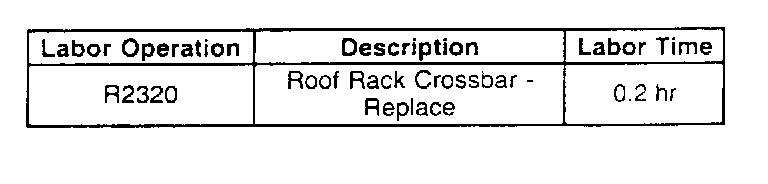
For vehicles repaired under warranty, use the table.

Disclaimer