Liftgate Emblem/Nameplate Replacement
Liftgate Emblem/Nameplate Replacement
Tools Required
J 25070 Heat Gun
Removal Procedure
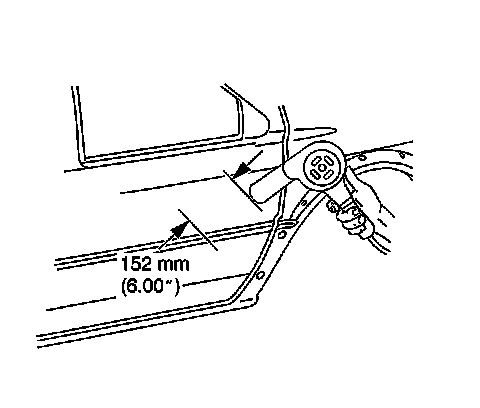
Important: Use the tape for protection and alignment marks for alignment of the new emblem.
1. Apply tape to the area around the liftgate emblem.
2. Heat the emblem/name plate, using a heat gun J 25070 152 mm (6 in) from the surface.
Apply the heat using a circular motion for about 30 seconds.
Notice: Refer to Exterior Trim Emblem Removal Notice in Cautions and Notices.
3. Remove the emblem/name plate from the liftgate surface using a small plastic flat-bladed tool.
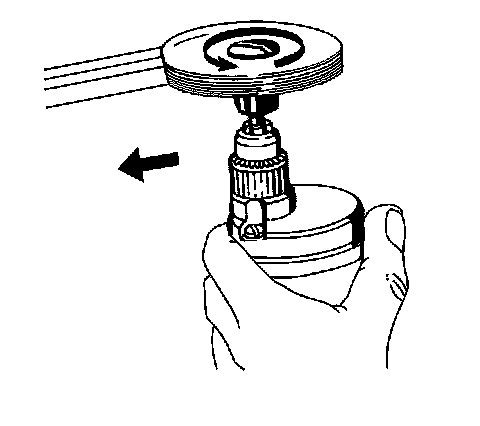
4. Remove all adhesive from the liftgate surface and the back of the emblem/name plate using 3M(TM) scotch brite molding adhesive remover disk 3M(TM) P/N 07501 or equivalent.
5. Clean the liftgate surface using Varnish Makers and Painters (VMP) naphtha.
Installation Procedure
1. Mark the tape with the measurement for the proper location of the emblem.
2. Warm the liftgate surface with a heat gun J 25070 152 mm (6 in) from the surface to a minimum of 21°C (70°F).
Important: Do not touch the adhesive backing on the emblem/nameplate.
3. Remove the backing from the front end of the emblem/name plate.
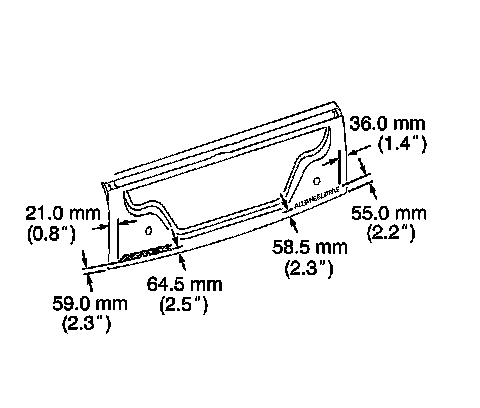
4. Press the emblem/name plate to the liftgate surface while continuing to remove the backing.
5. Hand roll the emblem/name plate to the liftgate to ensure proper adhesion.
6. Inspect the emblem/name plate for bonding.
7. Remove the tape from the area around the liftgate emblem.