Test C: Driver Information Center Temperature Display Always Reads SC
- If instrument panel cluster diagnostic system check has been performed, go to next step. If instrument panel cluster diagnostic system check has not been performed, go to INSTRUMENT PANEL CLUSTER DIAGNOSTIC SYSTEM CHECK under SELF-DIAGNOSTIC SYSTEM.
- Turn ignition switch to OFF position. Disconnect ambient air temperature sensor 2-pin harness connector. Ambient air temperature sensor is mounted on frame rail behind right head light. Turn ignition switch to RUN position. If Driver Information Center (DIC) does not display OC, go to next step. If Driver Information Center (DIC) displays OC, go to step 4.
- Check for short to ground in signal circuit of ambient air temperature sensor, Light Green/Black wire between ambient air temperature sensor harness connector terminal "A" and Instrument Panel Cluster (IPC) harness connector terminal A12. See Fig 1. See WIRING DIAGRAMS . If problem exists, repair as necessary and go to step 7. If no problem exists, go to step 5.
- Check for poor, loose or corroded terminals in ambient air temperature sensor harness connector. If problem exists, repair as necessary and go to step 7. If no problem exists, go to step 6.
- Replace IPC. See INSTRUMENT PANEL CLUSTER under REMOVAL & INSTALLATION. After repairs are made, go to step 7.
- Replace ambient air temperature sensor. After repairs are made, go to next step.
- Check system for normal operation. If system operates normally, test is complete. If system does not operate normally, go to step 2.
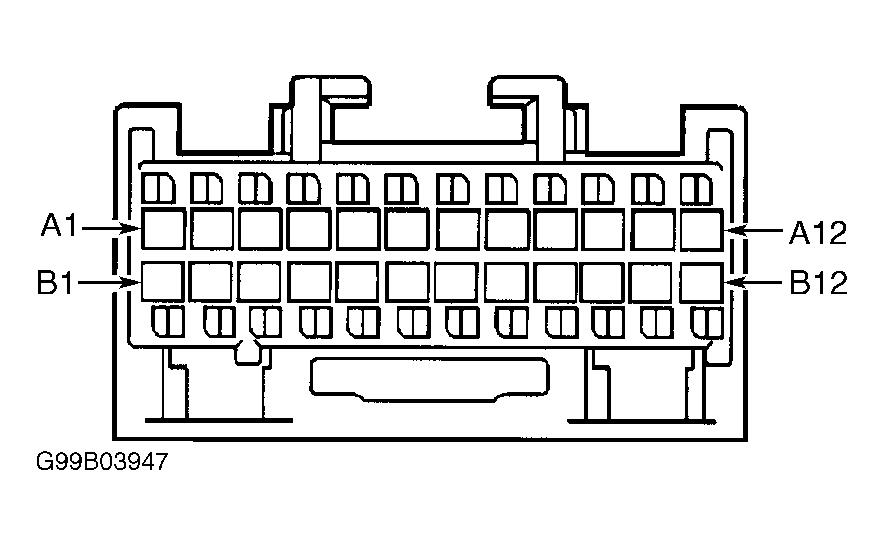 Courtesy of GENERAL MOTORS CORP.