Rear Caliper Adapter: Installation
- Install 3 hub/bearing attaching bolts into knuckle. Install caliper adapter on knuckle using 3 hub/bearing bolts to hold it in place. Install hub/bearing on stub shaft of outer C/V joint. Align hub/bearing with its 3 mounting bolts and hand start bolts in to flange of hub/bearing.
- Equally tighten 3 mounting bolts pulling hub/bearing onto stub shaft and into knuckle. Continue to equally tighten 3 mounting bolts until caliper adapter and hub bearing are squarely seated on knuckle. Then tighten 3 mounting bolts to 61 N.m (45 ft. lbs.).
- Install stub axle to hub/bearing retaining nut. See Figure
. Snug retaining nut at this time but do not attempt to tighten it to required torque specification. Install park brake cable into caliper adapter. Be sure locking tabs on cable retainer are expanded to ensure cable is held securely in adapter. Install park brake cable on park brake shoe actuator, located on rear of caliper adapter. See Figure
. Install bake rotor on hub/bearing.
- Install disc brake caliper on caliper adapter, reversing removal procedure. See Figure
. Install bolts mounting disc brake caliper to caliper adapter. See Figure
. Tighten mounting bolts to 27 N.m (20 ft. lbs.). Install wheel and tire. Lower vehicle so its full weight is supported by suspension. Apply park brake and have a helper apply vehicle brake system to keep vehicle from moving.
- Tighten stub shaft to hub bearing retaining nut to 142 N.m (105 ft. lbs.). See Figure
. Tighten wheel mounting nuts in proper sequence until all nuts are torqued to half specification. Then repeat tightening sequence to full specified torque of 122 N.m (90 ft. lbs.). Install center cap on wheel.
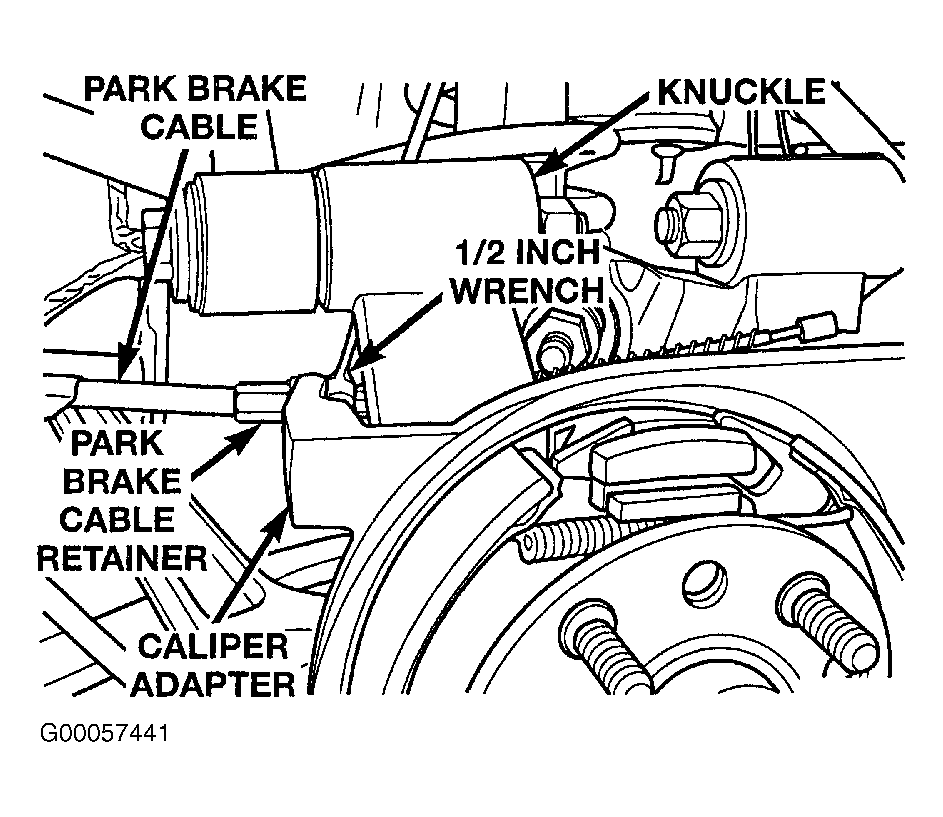 Courtesy of CHRYSLER CORP.