"Key & F.A.S.T. -Key Reg" METHOD
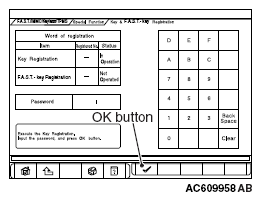
- When "Key & F.A.S.T. -Key Registration" screen is displayed, enter the password for the key registration and press the OK button. Then, "Executing!" is displayed and the key registration process starts.
NOTE:
- If the wrong password is entered consecutively 5 times, the password entry for the key registration will be disabled for 16 minutes.
- The key registration cannot be cancelled during the operation.
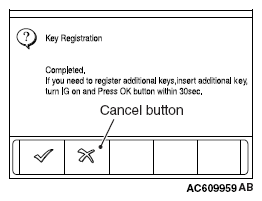
- When the key registration is completed, "Completed." is displayed. To continue the key registration, press the OK button according to the screen instructions. Then "Executing!" is displayed again and the next registration process starts. To finish the key registration and start the keyless operation key registration, press the cancel button. Then "Press OK button to start KOS key registration" is displayed.
 Courtesy of MITSUBISHI MOTOR SALES OF AMERICA.
NOTE:
- In order to register another key consecutively after registering the first key, the ignition switch must be turned to the ON position with the second key within 30 seconds after turning it to the "LOCK" (OFF) position with the first key. [When turning the ignition switch to the "ON" position or "LOCK" (OFF) position, be sure that the emergency key is connected to the keyless operation key. Do not use the emergency key independently.]
- Up to four keys can be registered.
 Courtesy of MITSUBISHI MOTOR SALES OF AMERICA.
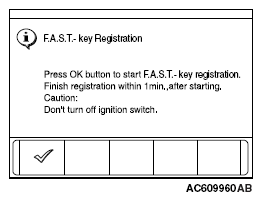
- Press the lock switch of the keyless operation key to be registered twice within 1 minute to allow the keyless operation key to be registered. Complete the registration within 1 minute and press the OK button. Then the keyless operation key registration ends.
 Courtesy of MITSUBISHI MOTOR SALES OF AMERICA.
NOTE:
- Up to 4 keyless operation keys can be registered.
- Register keyless operation keys inside the vehicle.
- Register the keyless operation keys with the key released from scan tool display.
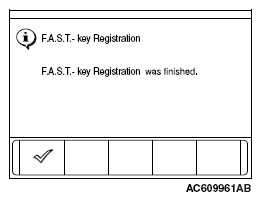
- Push the OK button after "F.A.S.T. -key Registration was finished." is displayed.
 Courtesy of MITSUBISHI MOTOR SALES OF AMERICA.
- Check the number of the registered keys and keyless operation keys.
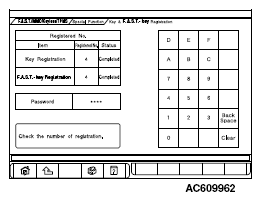 Courtesy of MITSUBISHI MOTOR SALES OF AMERICA.