Antenna Cable - Satellite Radio
Antenna Cable - Satellite Radio
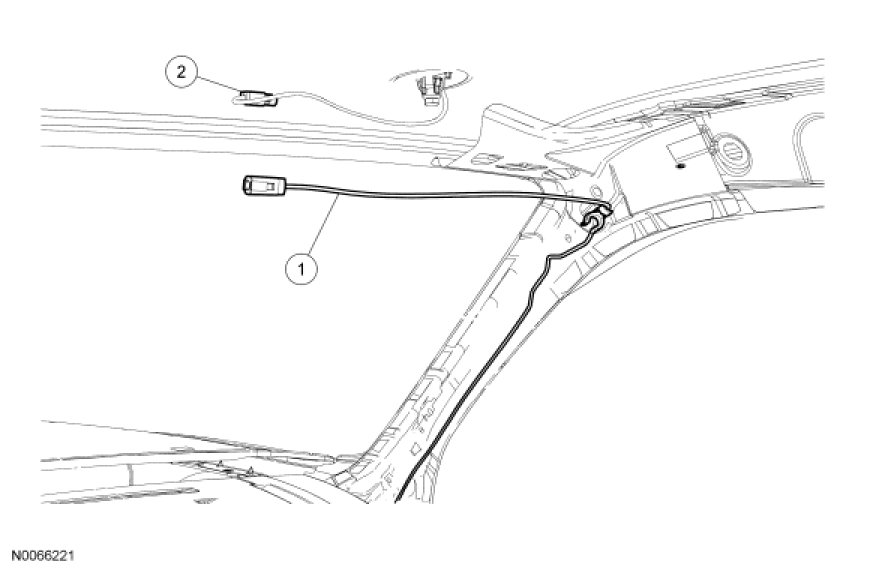


Removal
Upper cable
1. Remove the RH A-pillar trim panel.
2. Remove the RH sun visor.
3. Lower the front of the headliner enough to gain access to the satellite radio antenna electrical connector.
- Disconnect the satellite radio antenna electrical connector.
4. Remove the RH instrument panel side finish panel. For additional information, refer to Instrument Cluster / Carrier &/or Interior Moulding / Trim.
- Disconnect the upper-to-lower satellite radio antenna electrical connector.
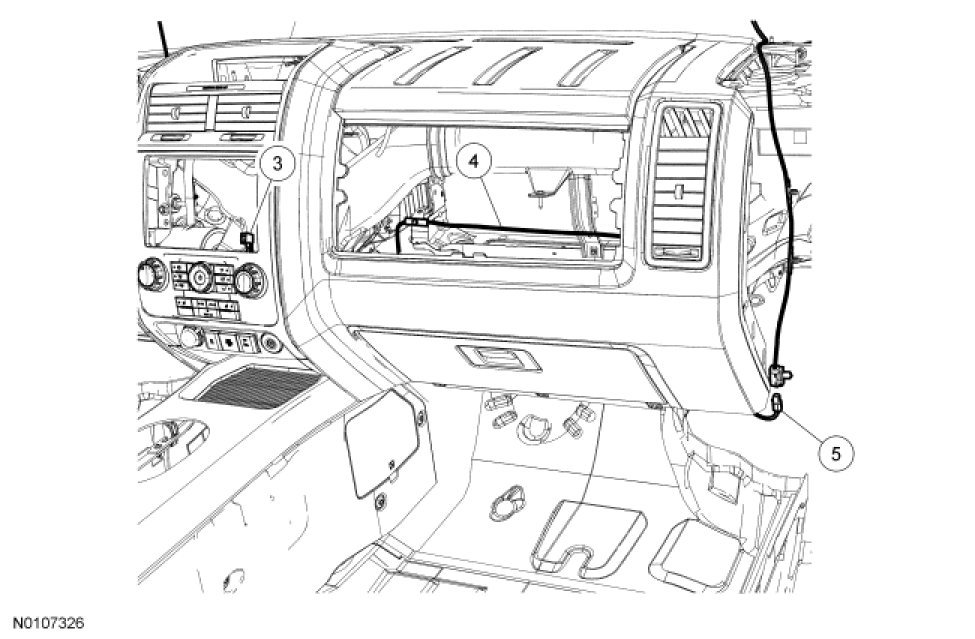
Lower cable
5. Remove the RH Instrument panel side finish panel. For additional information, refer to Instrument Cluster / Carrier &/or Interior Moulding / Trim.
- Disconnect the upper-to-lower satellite radio antenna electrical connector.
6. Remove the glove compartment. For additional information, refer to Instrument Panel - Exploded View in Instrument Cluster / Carrier &/or Interior Moulding / Trim.
7. Remove the ACM. For additional information, refer to Audio Control Module (ACM) Audio Control Module (ACM).
- Disconnect the lower satellite radio antenna electrical connector from the ACM.
All cables
8. To install, reverse the removal procedure.