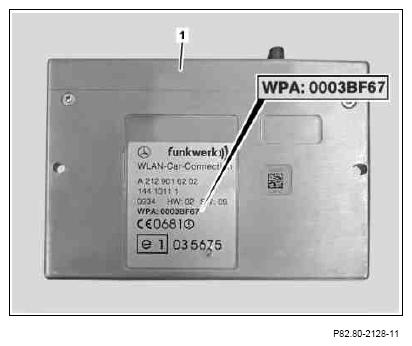
- Note "WPA" number of InCar Hotspot (1) on back of operator's manual.
 The operator's manual is included in the installation kit. Only note the "WPA" number if this has not yet been attached to the rear of the operator's manual in the form of a sticker. The "WPA" number of the InCar Hotspot (1) is on the model plate.
 Courtesy of MERCEDES-BENZ USA
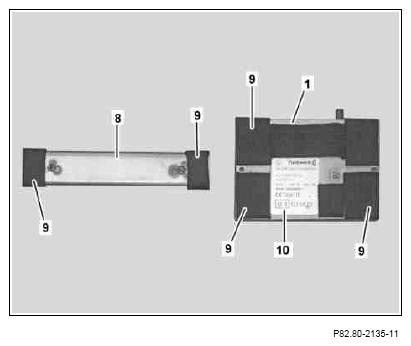
- Affix felt tape (9) to holder (8) as shown.
- Affix felt tape (9) to InCar Hotspot (1) as shown.
The model plate (10) must not have anything affixed to it.
 Courtesy of MERCEDES-BENZ USA
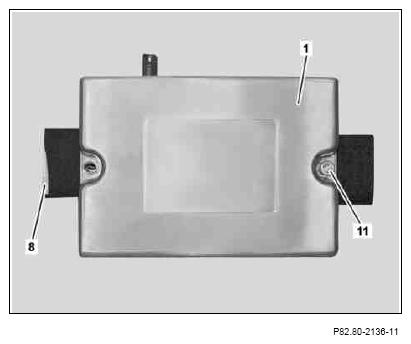
- Place InCar Hotspot (1) on holder (8) and secure with a screw/bolt (11).
Only screw in screw/bolt (11) by 4 to 5 turns, do not tighten.
 Courtesy of MERCEDES-BENZ USA
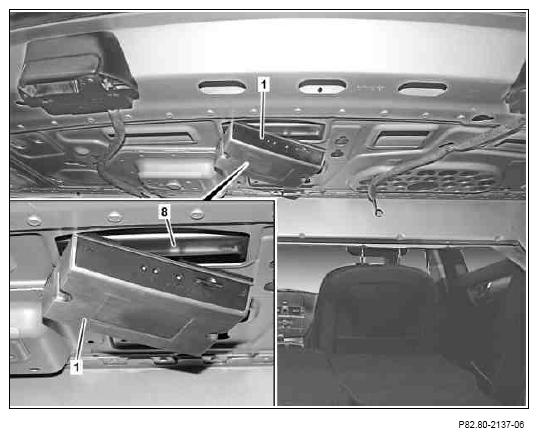
- Insert InCar Hotspot (1) and holder (8) into cutout in rear shelf.
Insert InCar Hotspot (1) and holder (8) into cutout with side that has not been screwed tight first. Align holder (8) in such a way that the previously attached felt tape is lying against the metal fold of the cutout.
 Courtesy of MERCEDES-BENZ USA
- Align InCar Hotspot (1) and screw in place using the screws/bolts (11).
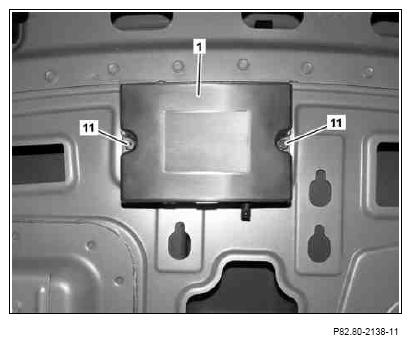 Courtesy of MERCEDES-BENZ USA