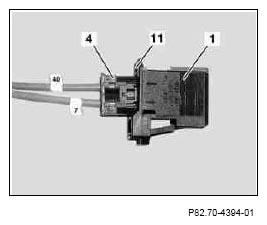
- Push catch hook (11) at housing (1) outwards a little and unclip black 2-pin coupling (4) from housing (1).
 Black 2-pin coupling (4) was connected to radio.
 Courtesy of MERCEDES-BENZ OF NORTH AMERICA.
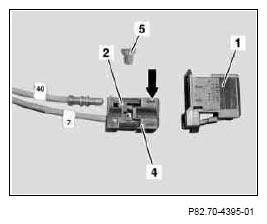
- Remove blue retaining clip (5) from black 2-pin coupling (4) and remove fiber optic cable labeled 40 from output (arrow) of black 2-pin coupling (4).
The output and the input are each marked with an arrow on the black 2-pin coupling (4).
 Courtesy of MERCEDES-BENZ OF NORTH AMERICA.
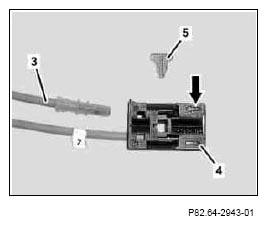
- Insert new fiber optic cable (3) into output (arrow) of black 2-pin coupling (4) and secure with blue retaining clip (5).
The new fiber optic cable (3) must audibly engage in the black 2-pin coupling (4).
 Courtesy of MERCEDES-BENZ OF NORTH AMERICA.
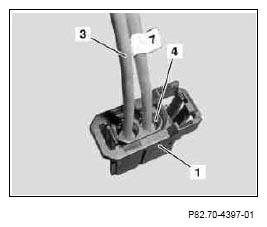
- Clip black 2-pin coupling (4) into housing (1).
Black 2-pin coupling must (4) audibly engage in housing (1).
 Courtesy of MERCEDES-BENZ OF NORTH AMERICA.
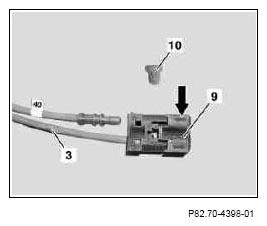
- Remove blue retaining clip (10) from black 2-pin coupling (9) of new fiber optic cable (3).
- Insert fiber optic cable labeled 40 removed from black 2-pin coupling into output (arrow) of black 2-pin coupling (9) and secure with blue retaining clip (10).
The fiber optic cable labeled 40 must audibly engage.
 Courtesy of MERCEDES-BENZ OF NORTH AMERICA.
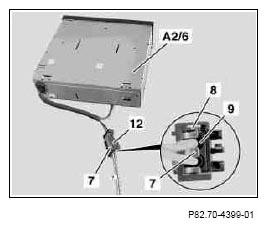
- Insert black 2-pin coupling (9) into fiber optic cable coupling (12) at CD changer (A2/6) and lock retaining bracket (7) as shown.
The catch hook (8) must audibly engage.
 Courtesy of MERCEDES-BENZ OF NORTH AMERICA.