For Bluetooth® Unit
- Switch the ignition to ACC or ON (engine off or on).
- While pressing the POWER/VOLUME button, press the PRESET button 4 and FOLDER button (down) for 3 s or more.
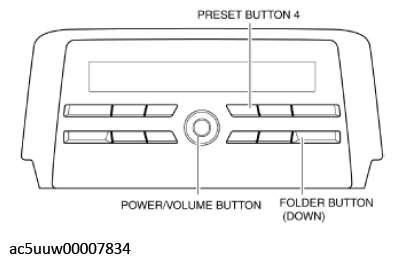 Courtesy of MAZDA MOTORS CORP.
- If a DTC is displayed, repair the malfunctioning location according to the applicable DTC troubleshooting. (See DTC TABLE [AUDIO UNIT] .)
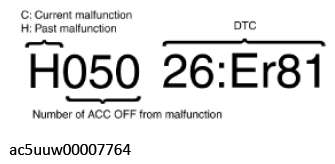 Courtesy of MAZDA MOTORS CORP.
NOTE:
- A maximum of 12 DTCs can be displayed.
- If several DTCs are displayed, press the TUNE button to switch the display.
- If there are no DTCs, "No Err" is displayed.
- If the TUNE button (down) is operated while the last DTC or "No Err" is displayed, the software version is displayed.
- If the TUNE button (down) is operated while the software version is displayed, the connected unit information is displayed.
- After completion of repairs, clear all DTCs stored in the Bluetooth® unit. (See CLEARING DTC [AUDIO UNIT] .)