Without center display
- Switch the ignition ON (engine off or on).
- Turn the audio unit on.
- Select [BT SETUP] by operating the MENU button of the audio unit, and press the POWER/VOLUME button.
- Select [PAIR DEVICE] by operating the POWER/VOLUME button of the audio unit, and press the POWER/VOLUME button.
NOTE:
- If seven Bluetooth devices have been programmed, "MEMORY FULL" is displayed and the pairing programming cannot be performed.
- A maximum of seven Bluetooth-enabled devices can be programmed to one vehicle.
- After "ENTER PIN" is displayed in the audio unit display for approx. 3s, verify that "PIN 0000 (initial value is 0000)" (4-digit pairing code) is displayed.
- Input the verified 4-digit pairing code by operating the PRESET 1 button, PRESET 2 button, PRESET 3 button, and PRESET 4 button of the audio unit, and press the POWER/VOLUME button.
- Verify that "PAIRING" flashes in the display of the audio unit.
- Input the same 4-digit pairing code which was input to the audio unit to the Bluetooth®-enabled device.
- After completing the pairing programming, verify that the "Musical note symbol" is displayed in the audio unit display, and then "PAIR SUCCESS" approx. 3 s afterward.
NOTE:
- If the pairing programming fails, "Err" flashes in the audio unit display for approx. 3 s and the screen returns to the [PAIR DEVICE] screen.
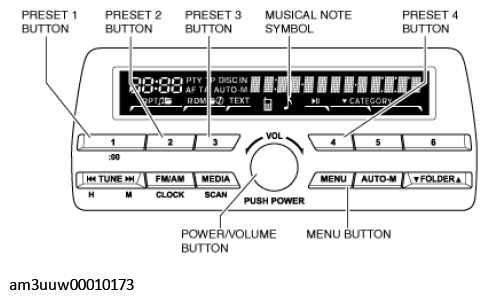 Courtesy of MAZDA MOTORS CORP.