If Bluetooth®-enabled device is version 2.0
- Switch the ignition ON (engine off or on).
- Select "Settings" from the home screen of the center display as shown in the figure.
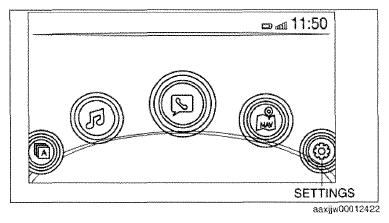 Courtesy of MAZDA MOTORS CORP.
- Select the following on the center display.
- [Devices]
- [Bluetooth]
- Bluetooth setting ON
- [Add New Device]
- Verify that the 4-digit pairing code (initial value "0000") is indicated in the center display.
- Input the 4-digit pairing code indicated in the center display into the Bluetooth®-enabled device.
NOTE:
- After inputting the 4-digit pairing code, the connectivity master unit (CMU) initiates the pairing programming with the Bluetooth®-enabled device.
- Connection permission and permission to access the contact list may be necessary depending on the Bluetooth®-enabled device.
- Verify that "Pairing complete Connection complete" is indicated in the center display.