Auxiliary Jack/USB Port/SD Card Slot Hub Removal/Installation
- Disconnect the negative battery terminal. (See NEGATIVE BATTERY TERMINAL DISCONNECTION/CONNECTION
.)
- Remove the console-up. (See REAR CONSOLE REMOVAL/INSTALLATION
.)
- While pressing the tabs of the auxiliary jack/USB port/SD card slot hub in the direction of arrows (1) shown in the figure, move the auxiliary jack/USB port/SD card slot hub in the direction of arrow (2) and detach the tabs of the auxiliary jack/USB port/SD card slot hub from the console-up.
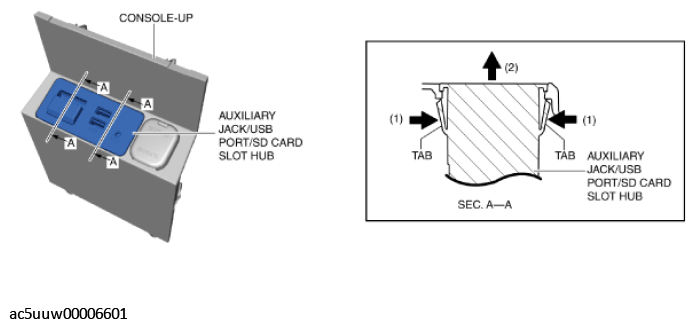 Courtesy of MAZDA MOTORS CORP.
- Remove the auxiliary jack/USB port/SD card slot hub.
- Install in the reverse order of removal.