Using center display
- Switch the ignition to ACC or ON (engine off or on).
- Display the display setting screen in the center display.
- Select [Settings icon] on the center display.
- Select [Screen tab] on the center display.
- Operate the center display in the following order.
- Touch and hold the right upper area of the screen (area A in figure) until a beep is heard (approx. 5 s or more).
- Touch and hold the left upper area of the screen (area B in figure) until a beep is heard (approx. 5 s or more).
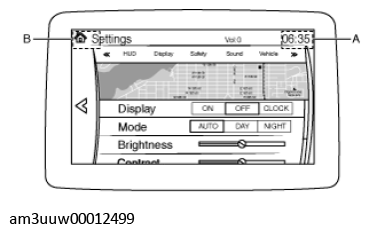 Courtesy of MAZDA MOTORS CORP.