Cd Player Removal
- Disconnect the negative battery cable. (See NEGATIVE BATTERY CABLE DISCONNECTION/CONNECTION
.)
- Shift the selector lever from the P position to the D position.
- To prevent scratches or damage, affix protective tape to the position shown in the figure of the console side panel.
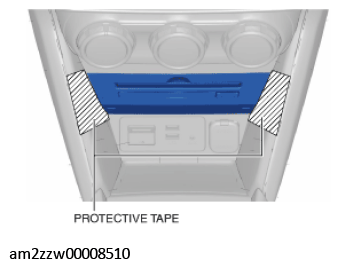 Courtesy of MAZDA MOTORS CORP.
- Insert the SSTs (removing tool) into the positions shown in the figure and disengage the CD player from the front console.
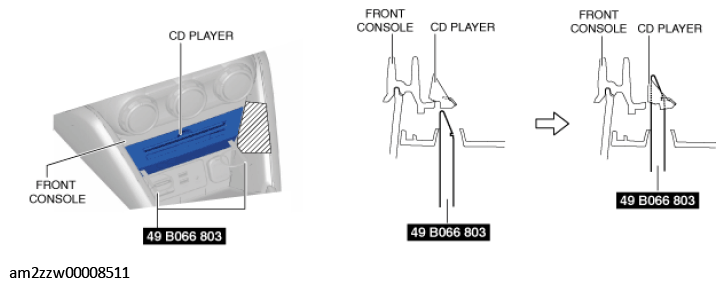 Courtesy of MAZDA MOTORS CORP.
- Pull the SSTs (removing tool) in the direction shown in the figure and remove the CD player from the front console.
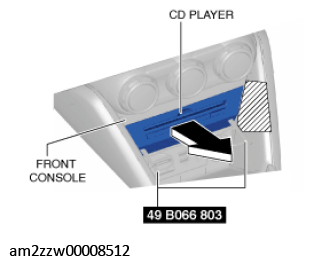 Courtesy of MAZDA MOTORS CORP.
- Disconnect the connector.
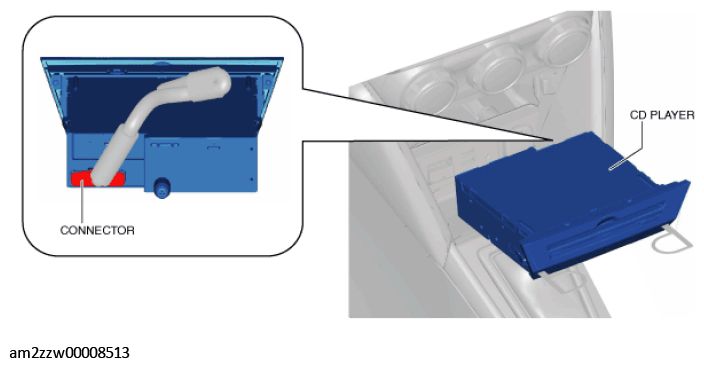 Courtesy of MAZDA MOTORS CORP.
- Remove the CD player.
- While pulling the SSTs (removing tool) in the direction of arrow (2) shown in the figure, press the CD player spring in the direction of arrow (1) shown in the figure.
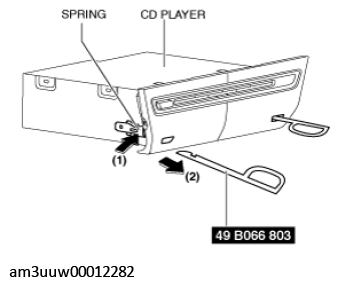 Courtesy of MAZDA MOTORS CORP.