Without Active Driving Display
- When replacing the instrument cluster, perform the configuration. (See INSTRUMENT CLUSTER CONFIGURATION (USING READ/WRITE FUNCTION) .)
- Disconnect the negative battery cable. (See NEGATIVE BATTERY CABLE DISCONNECTION/CONNECTION
.)
- Remove the upper column cover. (See COLUMN COVER REMOVAL/INSTALLATION
.)
- Remove the meter hood. (See METER HOOD REMOVAL/INSTALLATION
.)
- Remove the screws.
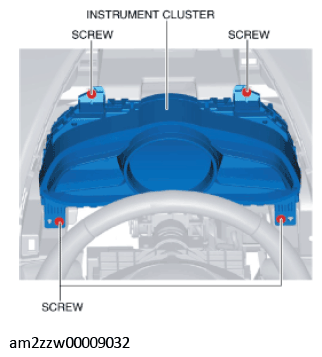 Courtesy of MAZDA MOTORS CORP.
CAUTION:
- When removing the instrument cluster, the instrument cluster may contact the light switch, wiper switch, or the start stop unit and the instrument cluster may be scratched. When removing the instrument cluster, cover the light switch, wiper switch, and start stop unit using a rag.
- Cover the light switch, wiper switch, and start stop unit using a rag to prevent scratches.
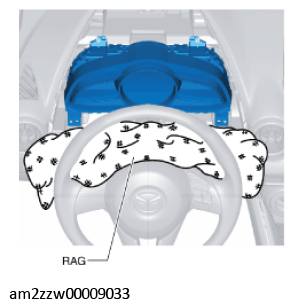 Courtesy of MAZDA MOTORS CORP.
- Pull the instrument cluster outward to detach it from the dashboard pins.
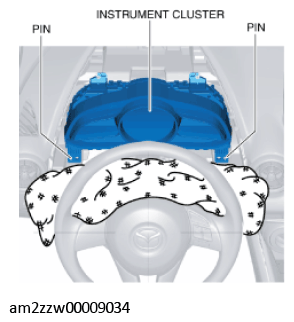 Courtesy of MAZDA MOTORS CORP.
- Rotate the instrument cluster in the direction of the arrow shown in the figure.
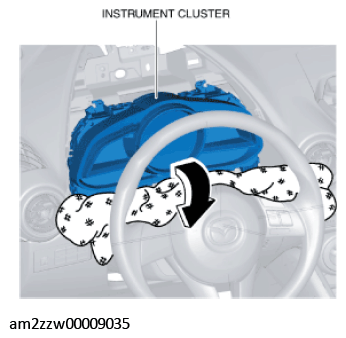 Courtesy of MAZDA MOTORS CORP.
- Disconnect the connector.
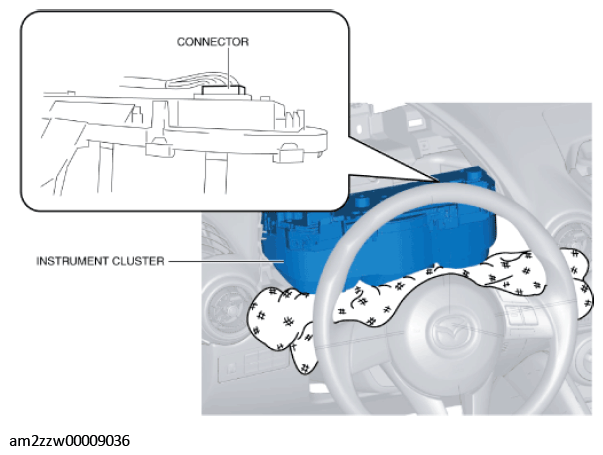 Courtesy of MAZDA MOTORS CORP.
- Remove the instrument cluster by sliding it between the dashboard and the steering.
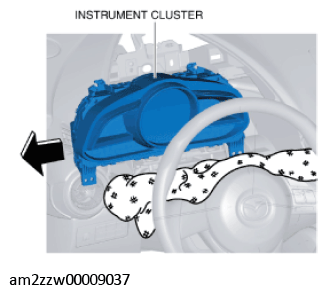 Courtesy of MAZDA MOTORS CORP.
- Install in the reverse order of removal.
CAUTION:
- If the instrument cluster is left for a long time with its screen facing down, grease applied to the needles may spill and the needles may not operate smoothly. When storing the instrument cluster, store it with its screen facing upward.
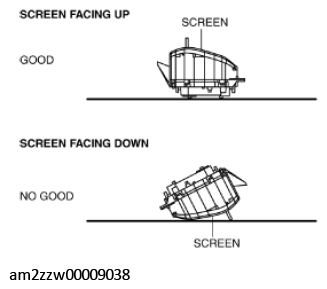 Courtesy of MAZDA MOTORS CORP.
- After performing the configuration (writing), switch the ignition ON (engine off or on) and verify that the instrument cluster operates normally.
- If [Fctry] or [Factory] is indicated on the traveled distance display, perform the following procedure to clear the indication.
- Remove the ROOM fuse.
- Switch the ignition ON (engine off) while touching the center of the push button start with the upper part of the remote transmitter.
- Switch the ignition OFF.
- Install the ROOM fuse.
- Switch the ignition ON (engine off) and verify that indication is cleared.