With Manufacturer's Scan Tool
STARTING PROCEDURE FOR ON-BOARD DIAGNOSTIC TEST MODE [HANDS-FREE TELEPHONE (HF/TEL) SYSTEM]NOTE: All DTCs displayed in the on-board diagnostic test mode should be entered in the Audio Repair Order Form.
Standard Audio
1. Turn the ignition switch to the ACC or ON position.
2. Turn the POWER button off.
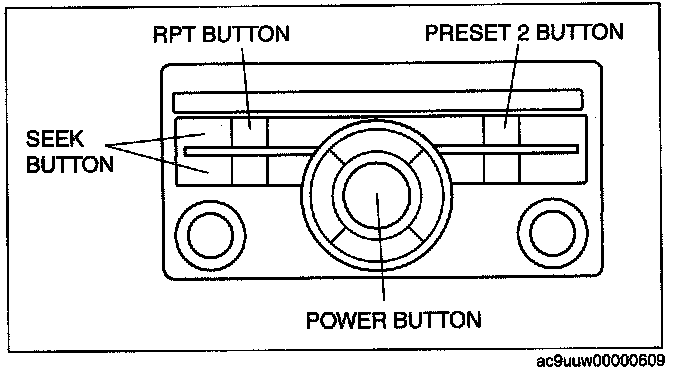
3. While pressing the POWER button, simultaneously press the RPT button and the PRESET 2 button for 3 s or more.
NOTE: If several DTCs are in the memory, they can be displayed using the SEEK button (up or down).
4. To stop the on-board diagnostic test mode, turn the ignition switch off.
Touch Panel Type Audio
1. Turn the ignition switch to the ACC or ON position.
2. Turn the POWER button off.
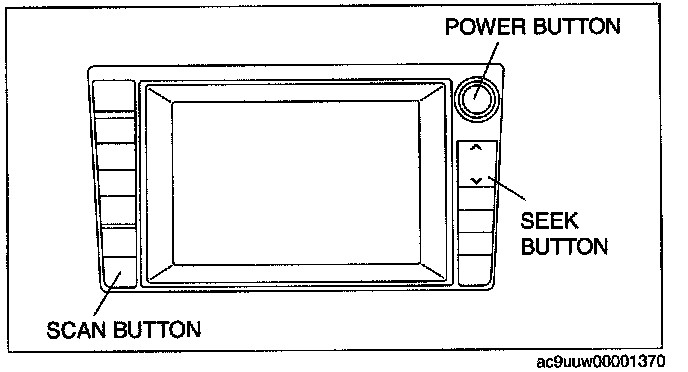
3. While pressing the POWER button, simultaneously press the SEEK button (lower) and the SCAN button for 2 s or more.
4. To stop the on-board diagnostic test mode, turn the ignition switch off.